 精華筆記
精華筆記 工具設計:agent 好壞的第一決定因素

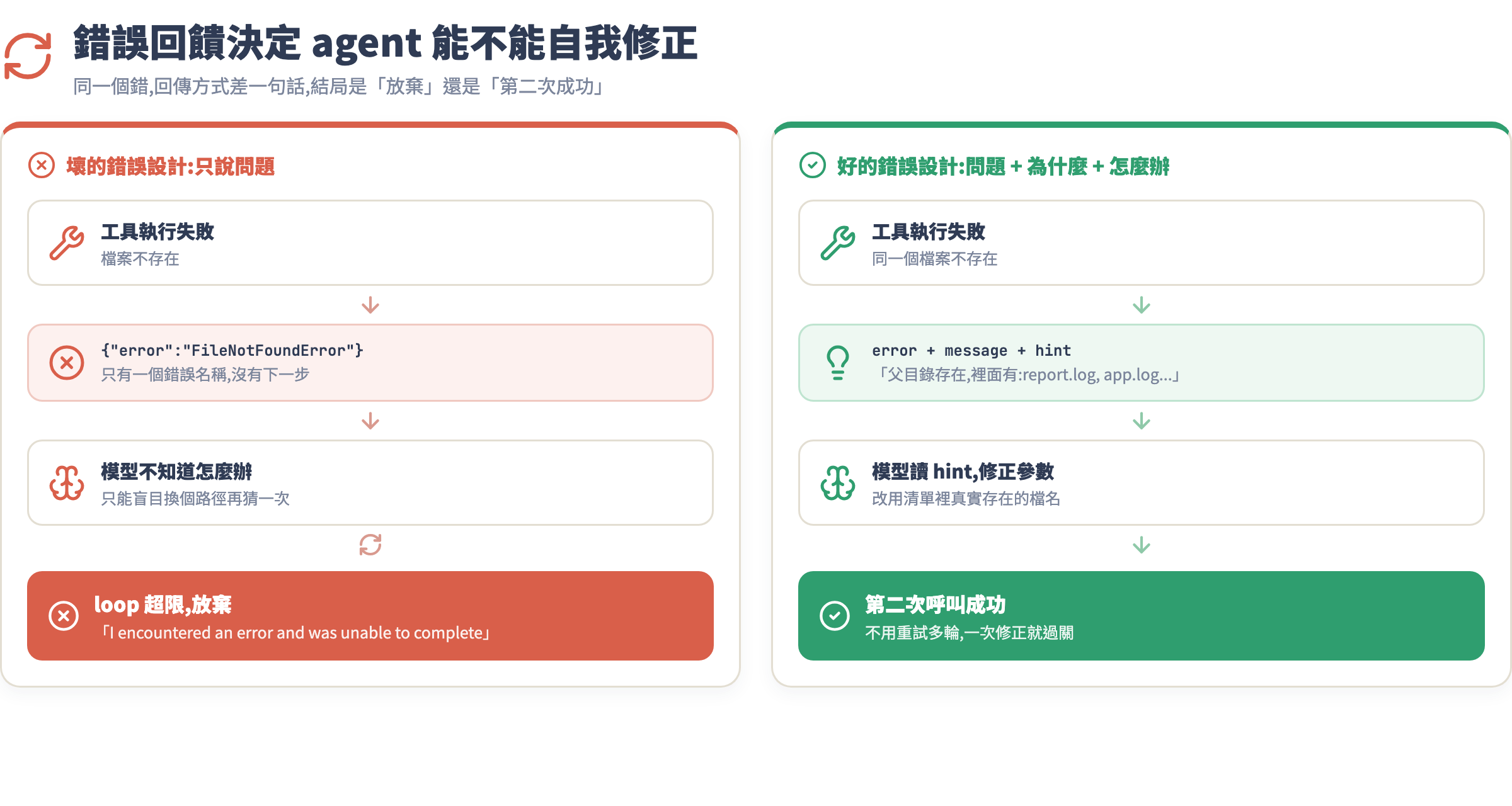
你的 agent 跑了三圈還是沒完成任務,context window 已經快滿了,最後輸出一句「I encountered an error and was unable to complete the task」。你盯著 log 半天,發現模型每次都選了一個看起來「差不多對」的工具,然後用錯參數,接著拿到一個沒有說明的錯誤,然後再猜一次,一直到放棄。
問題不在模型。Claude Opus 4.5、Sonnet 4.5 這一代的推理能力遠超過大多數任務的需求。問題在工具設計。工具是 agent 的手腳,description 是它的眼睛。你給的工具資訊愈模糊,agent 就像蒙眼走迷宮,再聰明也沒用。
這堂學什麼
- 好工具的四個原則:description 的本質、參數設計、回傳格式、危險操作確認
- 粒度問題:太細的工具讓 loop 變長、太粗的工具讓 agent 猜黑盒,找到甜蜜點
- 錯誤回饋設計:讓 agent 從失敗裡自我修正,而不是一直猜
- 危險操作的確認機制:不可逆操作絕對不能讓 agent 自行決定
- 實戰:從零設計一組檔案處理工具,走完設計→失敗→迭代的完整流程
觀念一:description 是寫給模型看的 API 文件
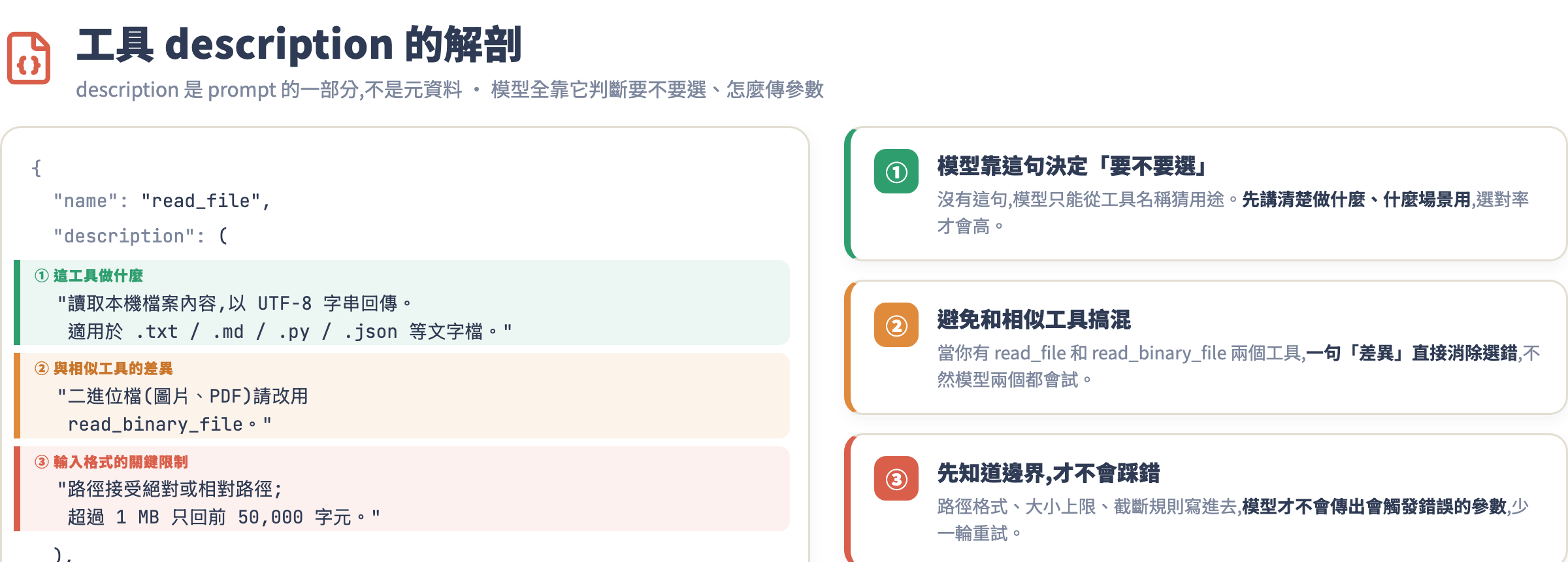
工具的 description 欄位不是給人看的備注——它是模型決定「要不要呼叫這個工具」、「要怎麼傳參數」的唯一依據。這句話值得重複一遍:description 是 prompt 的一部分,不是元資料。
很多人在這裡犯的錯:
# 爛的 description(工程師視角)
{
    "name": "read_file",
    "description": "Read file",
    "input_schema": {
        "type": "object",
        "properties": {
            "path": {"type": "string"}
        }
    }
}
「Read file」這三個字對人類工程師夠用——因為我們知道檔案系統。但模型面對的問題是:這個工具和 get_file_content、load_document、fetch_resource 有什麼差別?什麼情況下應該用?回傳的是 string 還是 bytes?路徑是相對路徑還是絕對路徑?
好的 description 要回答三件事:
- 這個工具做什麼、適用什麼場景
- 什麼情況下用它而不是其他類似工具
- 輸入格式的關鍵限制(路徑格式、大小限制等)
# 好的 description(模型視角)
{
    "name": "read_file",
    "description": (
        "讀取本機檔案內容並以 UTF-8 字串回傳。"
        "適用於文字檔(.txt, .md, .py, .json 等)。"
        "二進位檔案(圖片、PDF)請改用 read_binary_file。"
        "路徑接受絕對路徑或相對於工作目錄的相對路徑。"
        "檔案超過 1 MB 會回傳前 50,000 字元並附上截斷警告。"
    ),
    "input_schema": {
        "type": "object",
        "properties": {
            "path": {
                "type": "string",
                "description": "要讀取的檔案路徑,例如 './data/report.txt' 或 '/tmp/log.txt'"
            }
        },
        "required": ["path"]
    }
}
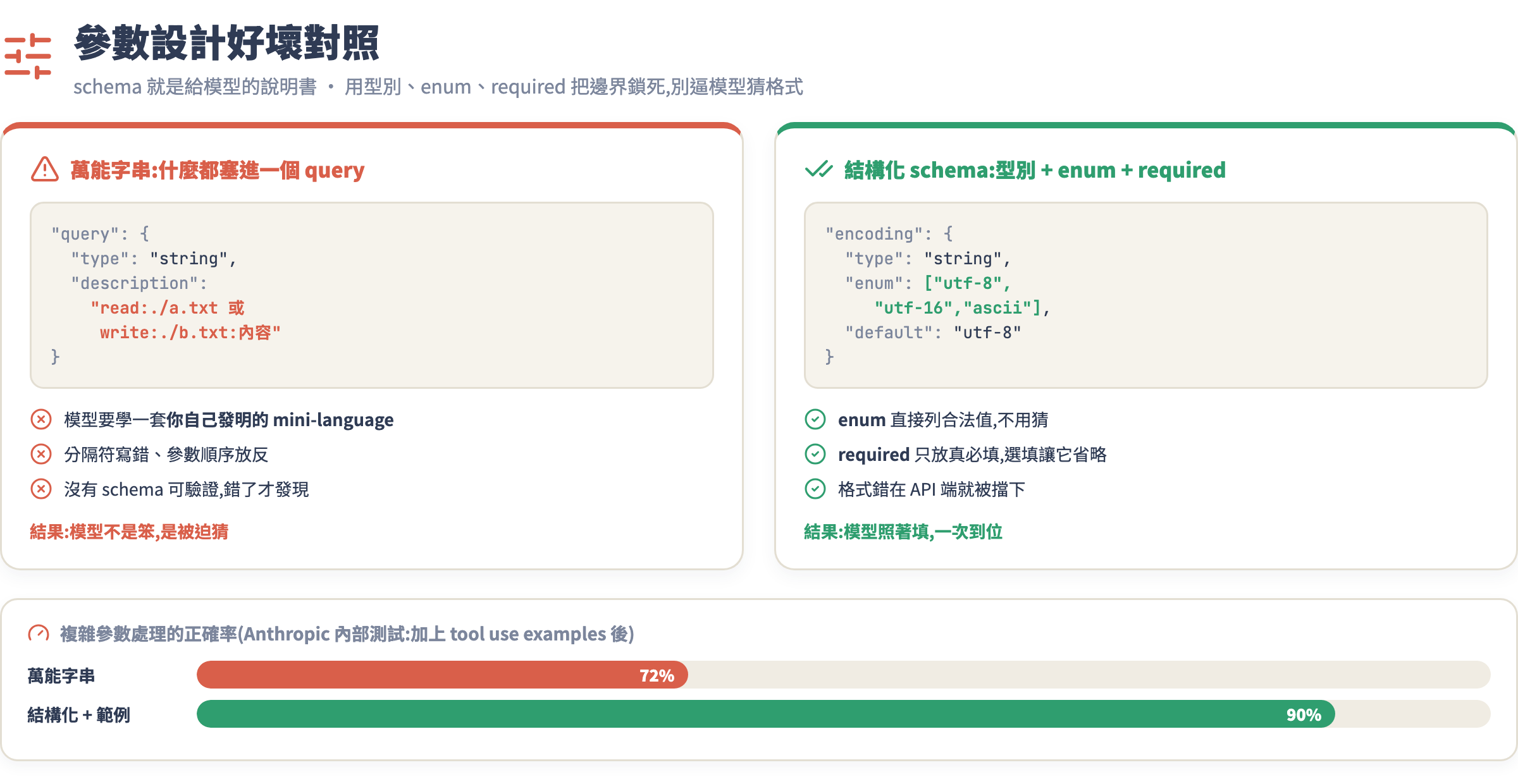
注意參數的 description 也是 prompt 的一部分,舉例說明比光寫「路徑」強太多。根據 Anthropic 內部測試,加上 tool use examples 之後複雜參數處理的準確率從 72% 提升到 90%。
觀念二:參數少而明確,禁止萬能輸入
參數設計的反模式是「萬能字串」:
# 危險設計:什麼都塞進一個 query 字串
{
    "name": "file_operation",
    "description": "對檔案執行操作",
    "input_schema": {
        "type": "object",
        "properties": {
            "query": {
                "type": "string",
                "description": "操作指令,例如 'read:./data.txt' 或 'write:./out.txt:content'"
            }
        }
    }
}
這種設計讓模型必須學會一套你自己發明的 mini-language,它當然會出錯——不是因為笨,而是因為這個格式沒有任何 schema 可以驗證。用 JSON Schema 的 enum、pattern、minimum、maximum 把邊界鎖死:
# 正確設計:參數有型別、有限制、有說明
{
    "name": "write_file",
    "description": (
        "將文字內容寫入指定檔案。"
        "若路徑不存在會自動建立目錄。"
        "不可寫入 /etc、/sys 等系統目錄。"
        "注意:此操作會覆蓋既有檔案內容,不可逆。"
    ),
    "input_schema": {
        "type": "object",
        "properties": {
            "path": {
                "type": "string",
                "description": "目標檔案路徑,例如 './output/result.md'"
            },
            "content": {
                "type": "string",
                "description": "要寫入的文字內容"
            },
            "encoding": {
                "type": "string",
                "enum": ["utf-8", "utf-16", "ascii"],
                "description": "文字編碼,預設 utf-8",
                "default": "utf-8"
            }
        },
        "required": ["path", "content"]
    }
}
enum 讓模型不需要猜測合法值;把 optional 參數放進 required 以外是對的——讓 agent 只在真正需要時才傳,不要逼它猜預設值。
觀念三:回傳值要給 agent 下一步用,錯誤要可行動
工具的回傳值不只是「答案」,它是 agent 在下一個 loop 做決策的輸入。兩個設計準則:
**成功回傳:只回高信號資訊。**別把整個 API 回應 dump 給 agent——它要讀的是上下文視窗,不是 grep。模型從長 JSON 裡抽取關鍵欄位的能力沒你想的好,而且浪費 token。
# 不好:raw API 回應,充滿雜訊
return {
    "status": 200,
    "headers": {...},
    "data": {
        "id": "file_abc123",
        "name": "report.txt",
        "created_at": "2026-07-04T10:00:00Z",
        "modified_at": "2026-07-04T11:30:00Z",
        "size_bytes": 42341,
        "permissions": "rw-r--r--",
        "owner": "charonyuu",
        "group": "staff",
        "content": "實際內容在這..."
    }
}

# 好:只回 agent 需要的
return {
    "content": "實際內容在這...",
    "size_bytes": 42341,
    "truncated": False
}
**錯誤回傳:告訴 agent 怎麼修正。**這是最多人忽略的部分。如果你的工具只回傳 {"error": "FileNotFoundError"},agent 知道出錯了,但它不知道要怎麼辦。好的錯誤訊息包含三個要素:什麼出錯了、為什麼、建議的修正方向。
def read_file(path: str) -> dict:
    try:
        with open(path, 'r', encoding='utf-8') as f:
            content = f.read()
        return {"success": True, "content": content}
    except FileNotFoundError:
        # 壞的錯誤:只說問題
        # return {"success": False, "error": "FileNotFoundError"}

        # 好的錯誤:說問題 + 為什麼 + 怎麼辦
        import os
        parent = os.path.dirname(path)
        alternatives = []
        if os.path.exists(parent):
            alternatives = os.listdir(parent)[:5]

        return {
            "success": False,
            "error": "FILE_NOT_FOUND",
            "message": f"找不到檔案:{path}",
            "hint": (
                f"請確認路徑是否正確。"
                f"父目錄 '{parent}' 存在,其中包含:{alternatives}"
                if alternatives else
                f"父目錄 '{parent}' 也不存在,請先建立目錄或確認路徑。"
            )
        }
    except UnicodeDecodeError:
        return {
            "success": False,
            "error": "ENCODING_ERROR",
            "message": f"無法以 UTF-8 讀取:{path}",
            "hint": "此可能是二進位檔案,請改用 read_binary_file 工具"
        }
當工具回傳帶有 hint 的錯誤,Claude 在下一個 loop 就有足夠資訊做正確的修正,而不是盲目重試或放棄。
觀念四:工具粒度——太細和太粗都會搞死 agent
這是工具設計最難拿捏的地方,也是很多 agent 時間和 token 浪費的根源。
太細粒度(chatty tools)
# 每個操作都是獨立工具
tools = [
    "open_file",          # 開檔
    "seek_to_position",   # 移動指標
    "read_line",          # 讀一行
    "close_file",         # 關檔
]
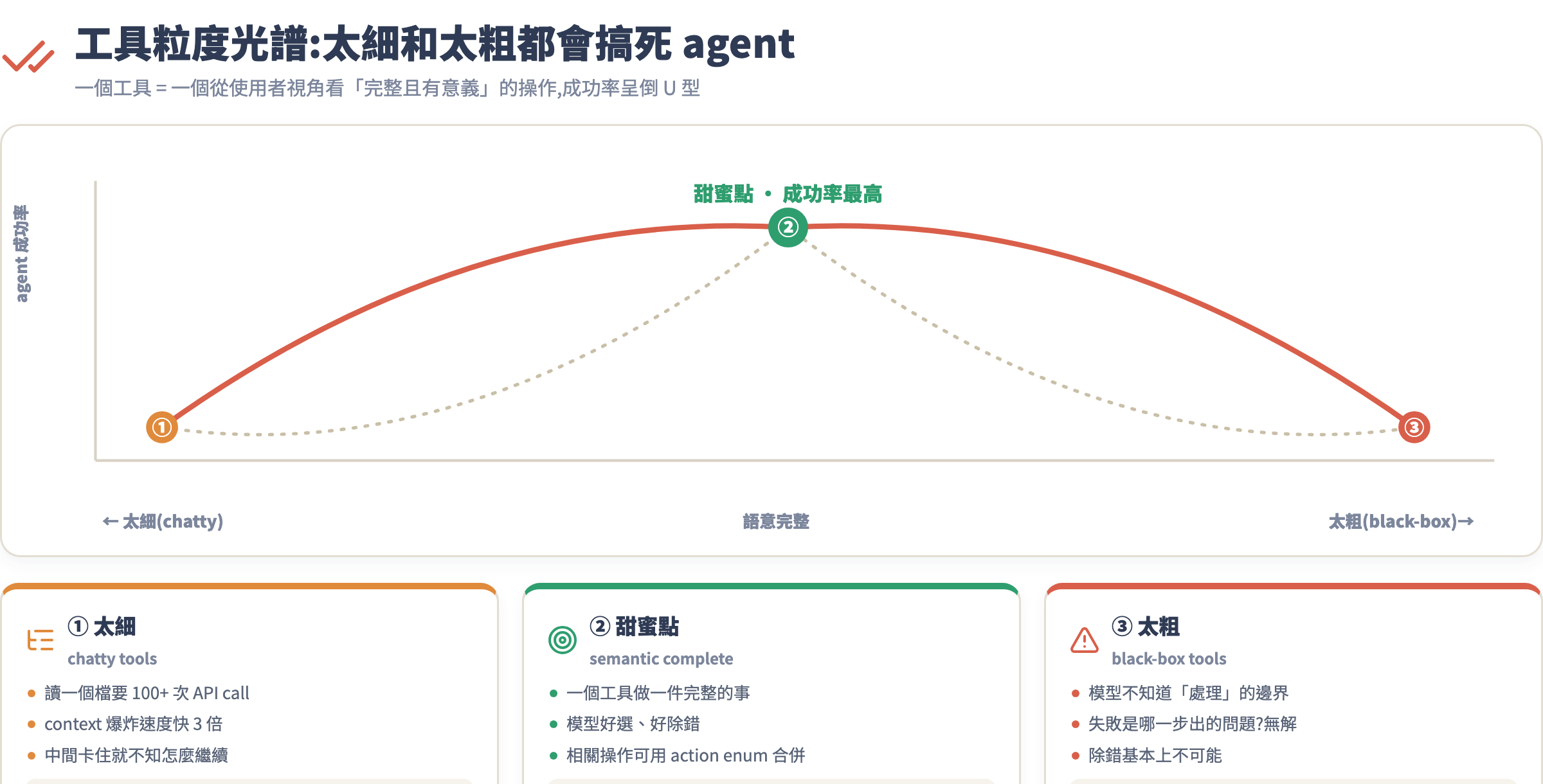
讀一個 100 行的檔案要跑 100+ 次 API call,每次都要等模型決定下一步,context 爆炸速度快 3 倍,而且模型很容易在中間某一步出錯後不知道怎麼繼續。
太粗粒度(black-box tools)
# 一個工具做太多事
{
    "name": "process_documents",
    "description": "處理所有文件:讀取、轉換、寫入、清理",
    "input_schema": {
        "type": "object",
        "properties": {
            "action": {"type": "string", "description": "要做什麼"}
        }
    }
}
模型不知道「處理」的邊界在哪,也無法知道「失敗」是哪一步出的問題,除錯基本上不可能。
甜蜜點:按語意完整的操作劃分
一個工具 = 一個從使用者視角看「完整且有意義」的操作。以檔案處理為例:
tools = [
    "read_file",           # 讀取完整檔案內容
    "write_file",          # 寫入/覆蓋檔案
    "append_to_file",      # 追加內容(不覆蓋)
    "list_directory",      # 列出目錄內容
    "move_file",           # 搬移或重新命名
    "delete_file",         # 刪除(需確認旗標)
]
六個工具,每個做一件完整的事,不多不少。Anthropic 的官方建議也呼應這點:把相關操作合併成一個工具加上 action enum,比拆成十幾個小工具更容易讓模型正確選擇。
觀念五:危險操作的確認機制
不可逆操作——刪除檔案、清空資料庫、發出 email、部署上線——絕對不能讓 agent 自行決定。這不是不信任 Claude,而是架構設計的基本原則。
實務上,使用者面對 agent 的確認提示(permission prompt)絕大多數時候會習慣性地直接按確認,很少真的逐項檢查,這代表單靠「詢問使用者」不夠,系統層面就要把危險操作隔離。
實作上有三層防護:
第一層:工具本身的 dry_run 模式
{
    "name": "delete_files",
    "description": (
        "刪除指定的檔案或目錄。此操作不可逆。"
        "建議先以 dry_run=true 確認影響範圍,再執行實際刪除。"
    ),
    "input_schema": {
        "type": "object",
        "properties": {
            "paths": {
                "type": "array",
                "items": {"type": "string"},
                "description": "要刪除的路徑清單"
            },
            "dry_run": {
                "type": "boolean",
                "description": "true=只列出會被刪除的項目、不真的刪除。預設 true",
                "default": True
            }
        },
        "required": ["paths"]
    }
}
在 description 裡明確說「先跑 dry_run」,Claude 通常會自己先確認再動手——這是利用它的謹慎特質。
第二層:system prompt 層級的安全規則
system_prompt = """
你是一個檔案管理 agent。操作規則:
1. 任何刪除操作必須先 dry_run 確認,再等使用者輸入「確認刪除」後才真的執行
2. 不得在沒有明確指示的情況下刪除檔案
3. 影響超過 10 個檔案的批次操作必須向使用者說明影響範圍後再執行
"""
第三層:harness 層的攔截
def tool_executor(tool_name: str, tool_input: dict) -> dict:
    DANGEROUS_TOOLS = {"delete_files", "format_disk", "drop_database"}

    if tool_name in DANGEROUS_TOOLS and not tool_input.get("dry_run", True):
        # 強制暫停,等人工確認
        print(f"⚠️  危險操作攔截:{tool_name}")
        print(f"   參數:{tool_input}")
        confirm = input("輸入 'yes' 確認執行,其他輸入取消: ")
        if confirm.lower() != 'yes':
            return {
                "success": False,
                "error": "USER_CANCELLED",
                "message": "使用者取消了此操作"
            }

    return execute_tool(tool_name, tool_input)
三層加起來:工具引導謹慎行為、system prompt 設規則、harness 做最後防線。
手把手實戰:設計一組檔案處理工具
我們從「第一版有問題的設計」出發,走一遍真實的迭代過程。
第一版:直覺設計(有問題)
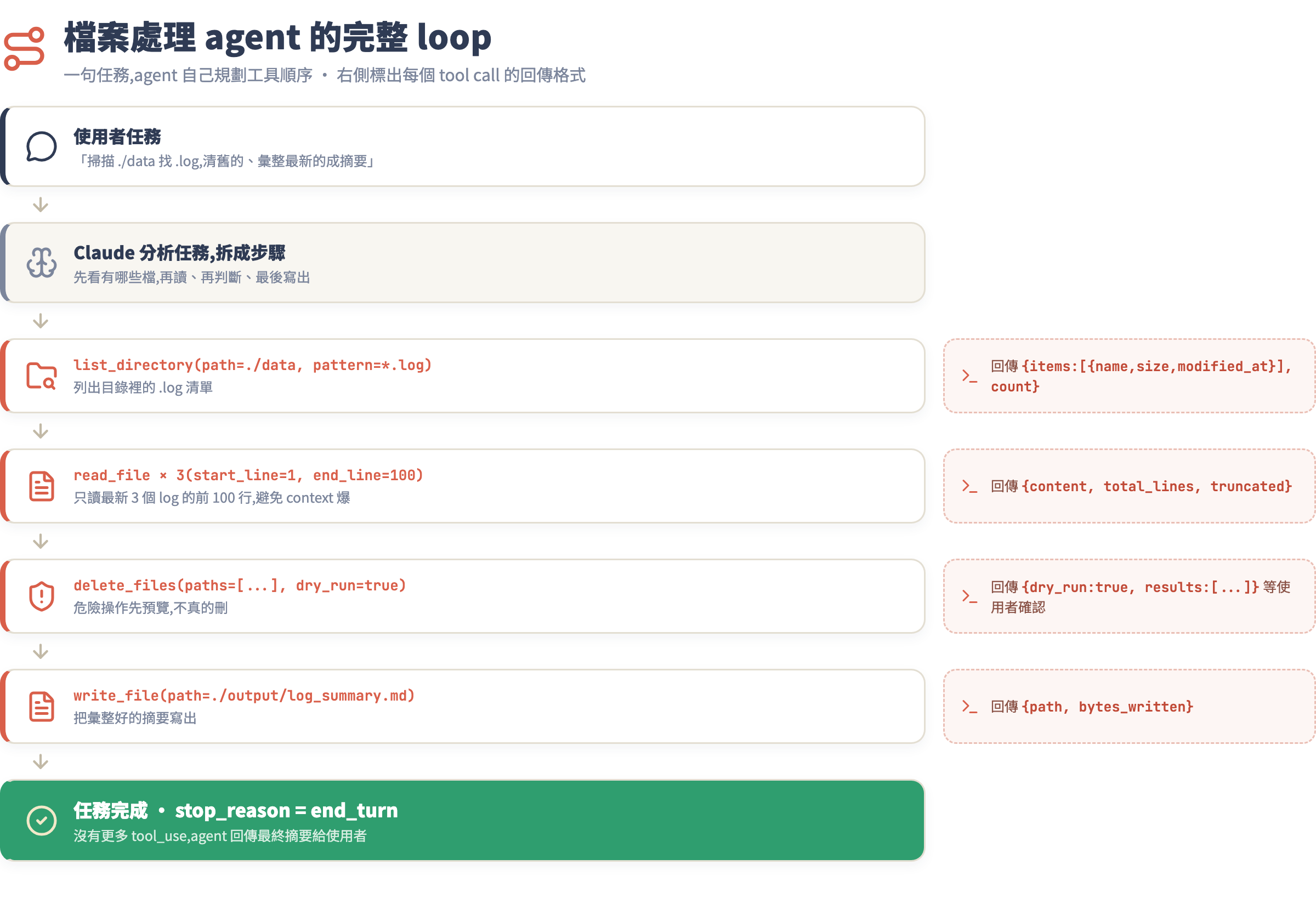
假設任務:「掃描 ./data 目錄,找出所有 .log 檔,把超過 7 天的刪掉,把最新的彙整成摘要。」
import anthropic
import os
import json
from datetime import datetime, timedelta

client = anthropic.Anthropic()

# 第一版工具定義(有問題)
tools_v1 = [
    {
        "name": "list_files",
        "description": "列出目錄內的檔案",
        "input_schema": {
            "type": "object",
            "properties": {
                "path": {"type": "string"}
            },
            "required": ["path"]
        }
    },
    {
        "name": "delete_file",
        "description": "刪除檔案",
        "input_schema": {
            "type": "object",
            "properties": {
                "path": {"type": "string"}
            },
            "required": ["path"]
        }
    },
    {
        "name": "read_file",
        "description": "讀取檔案",
        "input_schema": {
            "type": "object",
            "properties": {
                "path": {"type": "string"}
            },
            "required": ["path"]
        }
    }
]
這個版本有三個問題:
list_files沒說回傳格式,沒說會不會含子目錄delete_file是危險操作,沒有 dry_run,沒有確認機制read_file沒說超大檔案怎麼處理,沒說過濾條件
跑起來會怎樣?agent 可能直接開始刪檔案,不先確認;也可能把 1 GB 的 log 塞進 context,token 爆掉。
第二版:加上完整 description 和錯誤處理
import os
import glob
from pathlib import Path
from datetime import datetime
import json

# 工具定義 v2
tools_v2 = [
    {
        "name": "list_directory",
        "description": (
            "列出指定目錄中的檔案與子目錄。"
            "可選擇依副檔名過濾(例如 '*.log')。"
            "回傳每個項目的名稱、大小(bytes)、最後修改時間(ISO 8601)、是否為目錄。"
            "不遞迴進入子目錄,只列出直屬項目。"
            "如需遞迴搜尋請用 find_files 工具。"
        ),
        "input_schema": {
            "type": "object",
            "properties": {
                "path": {
                    "type": "string",
                    "description": "目標目錄路徑,例如 './data' 或 '/tmp/logs'"
                },
                "pattern": {
                    "type": "string",
                    "description": "glob 過濾樣式,例如 '*.log'、'*.txt'。省略則列出全部"
                }
            },
            "required": ["path"]
        }
    },
    {
        "name": "read_file",
        "description": (
            "讀取文字檔內容,以 UTF-8 字串回傳。"
            "適用於 .txt/.log/.json/.md/.py 等文字格式。"
            "大於 100KB 的檔案只回傳前 50,000 字元並標記 truncated=true。"
            "需要讀取特定行範圍請傳入 start_line 和 end_line。"
        ),
        "input_schema": {
            "type": "object",
            "properties": {
                "path": {
                    "type": "string",
                    "description": "檔案路徑"
                },
                "start_line": {
                    "type": "integer",
                    "description": "從第幾行開始讀(1-indexed),省略則從頭"
                },
                "end_line": {
                    "type": "integer",
                    "description": "讀到第幾行結束,省略則到尾"
                }
            },
            "required": ["path"]
        }
    },
    {
        "name": "delete_files",
        "description": (
            "刪除一或多個檔案。此操作不可逆。"
            "強烈建議先以 dry_run=true 確認影響範圍再設為 false 執行。"
            "dry_run=true 時只回傳「會被刪除的清單」,不執行刪除。"
        ),
        "input_schema": {
            "type": "object",
            "properties": {
                "paths": {
                    "type": "array",
                    "items": {"type": "string"},
                    "description": "要刪除的檔案路徑清單"
                },
                "dry_run": {
                    "type": "boolean",
                    "description": "true=預覽模式(不刪除),false=真實刪除。預設 true",
                    "default": True
                }
            },
            "required": ["paths"]
        }
    },
    {
        "name": "write_file",
        "description": (
            "將文字內容寫入檔案。若檔案已存在會覆蓋。"
            "若路徑的父目錄不存在會自動建立。"
            "回傳寫入的 byte 數。"
        ),
        "input_schema": {
            "type": "object",
            "properties": {
                "path": {
                    "type": "string",
                    "description": "目標檔案路徑"
                },
                "content": {
                    "type": "string",
                    "description": "要寫入的文字內容"
                }
            },
            "required": ["path", "content"]
        }
    }
]
實作工具執行函式
def execute_tool(tool_name: str, tool_input: dict) -> dict:
    """統一的工具執行入口,含錯誤處理"""

    if tool_name == "list_directory":
        path = tool_input["path"]
        pattern = tool_input.get("pattern", "*")

        if not os.path.exists(path):
            return {
                "success": False,
                "error": "PATH_NOT_FOUND",
                "message": f"目錄不存在:{path}",
                "hint": "請確認路徑是否正確,或用 write_file 先建立所需結構"
            }

        if not os.path.isdir(path):
            return {
                "success": False,
                "error": "NOT_A_DIRECTORY",
                "message": f"{path} 是檔案而非目錄",
                "hint": "若要列出父目錄,請傳入父目錄路徑"
            }

        items = []
        for entry in Path(path).glob(pattern):
            stat = entry.stat()
            items.append({
                "name": entry.name,
                "path": str(entry),
                "is_dir": entry.is_dir(),
                "size_bytes": stat.st_size,
                "modified_at": datetime.fromtimestamp(stat.st_mtime).isoformat()
            })

        return {"success": True, "items": items, "count": len(items)}

    elif tool_name == "read_file":
        path = tool_input["path"]
        start_line = tool_input.get("start_line")
        end_line = tool_input.get("end_line")

        if not os.path.exists(path):
            parent = os.path.dirname(path)
            nearby = []
            if os.path.exists(parent):
                nearby = [f.name for f in Path(parent).iterdir()][:5]
            return {
                "success": False,
                "error": "FILE_NOT_FOUND",
                "message": f"找不到檔案:{path}",
                "hint": f"父目錄 {parent} 中有:{nearby}" if nearby else f"父目錄 {parent} 不存在"
            }

        try:
            with open(path, 'r', encoding='utf-8') as f:
                lines = f.readlines()

            # 行範圍篩選
            if start_line or end_line:
                s = (start_line or 1) - 1
                e = end_line or len(lines)
                lines = lines[s:e]

            content = "".join(lines)
            truncated = False

            if len(content.encode('utf-8')) > 100_000:
                content = content[:50_000]
                truncated = True

            return {
                "success": True,
                "content": content,
                "total_lines": len(lines),
                "truncated": truncated
            }
        except UnicodeDecodeError:
            return {
                "success": False,
                "error": "ENCODING_ERROR",
                "message": f"無法以 UTF-8 解讀:{path}",
                "hint": "此可能是二進位檔案,不適合 read_file"
            }

    elif tool_name == "delete_files":
        paths = tool_input["paths"]
        dry_run = tool_input.get("dry_run", True)  # 預設安全模式

        results = []
        for p in paths:
            if os.path.exists(p):
                results.append({
                    "path": p,
                    "size_bytes": os.path.getsize(p),
                    "would_delete" if dry_run else "deleted": True
                })
                if not dry_run:
                    os.remove(p)
            else:
                results.append({"path": p, "error": "不存在"})

        return {
            "success": True,
            "dry_run": dry_run,
            "results": results,
            "message": (
                f"預覽:將刪除 {len(results)} 個檔案。確認後請以 dry_run=false 執行。"
                if dry_run else
                f"已刪除 {len(results)} 個檔案。"
            )
        }

    elif tool_name == "write_file":
        path = tool_input["path"]
        content = tool_input["content"]

        os.makedirs(os.path.dirname(path) or ".", exist_ok=True)
        with open(path, 'w', encoding='utf-8') as f:
            bytes_written = f.write(content)

        return {
            "success": True,
            "path": path,
            "bytes_written": len(content.encode('utf-8'))
        }

    return {"success": False, "error": "UNKNOWN_TOOL", "message": f"未知工具:{tool_name}"}
組裝 agent loop 並跑任務
def run_file_agent(task: str, tools: list) -> str:
    """簡單的 agent loop,含工具執行與安全攔截"""

    messages = [{"role": "user", "content": task}]

    system = """你是一個檔案管理 agent。
規則:
1. 刪除操作必須先用 dry_run=true 確認清單,輸出給使用者看
2. 確認影響超過 5 個檔案的操作前,先列出清單
3. 遇到錯誤時,根據 hint 修正後重試,最多重試 2 次
"""

    while True:
        response = client.messages.create(
            model="claude-opus-4-5",
            max_tokens=4096,
            system=system,
            tools=tools,
            messages=messages
        )

        # 沒有更多工具呼叫,任務完成
        if response.stop_reason == "end_turn":
            return response.content[0].text

        # 處理工具呼叫
        tool_results = []
        for block in response.content:
            if block.type == "tool_use":
                print(f"  → 呼叫工具:{block.name}({json.dumps(block.input, ensure_ascii=False)})")
                result = execute_tool(block.name, block.input)
                print(f"    回傳:{json.dumps(result, ensure_ascii=False)[:200]}...")

                tool_results.append({
                    "type": "tool_result",
                    "tool_use_id": block.id,
                    "content": json.dumps(result, ensure_ascii=False)
                })

        # 把工具結果加回對話
        messages.append({"role": "assistant", "content": response.content})
        messages.append({"role": "user", "content": tool_results})

# 執行
task = """
掃描 ./data 目錄,找出所有 .log 檔:
1. 列出所有 .log 檔的名稱與修改時間
2. 找出超過 7 天沒有修改的 log,dry_run 給我看清單
3. 把最新的 3 個 log 的前 100 行讀出來,彙整摘要,寫到 ./output/log_summary.md
"""

result = run_file_agent(task, tools_v2)
print(result)
常見坑
坑 1:description 太短,導致 agent 選錯工具
症狀:有 list_directory 和 find_files 兩個工具,agent 每次都選錯一個,或兩個都試。
根本原因:description 沒說兩者的差異。模型判斷「用哪個工具」的依據完全來自 description——如果兩個 description 都只說「列出檔案」,它就只能猜。
解法:在每個工具的 description 裡明確寫「與 X 工具的差異」。例如:「list_directory 只列直屬項目,不進入子目錄;若需遞迴搜尋請用 find_files」。這一句直接解決選錯的問題。
坑 2:is_error: true 的工具結果讓 agent 提前放棄
症狀:工具拋出 Python 例外,harness 直接把 traceback 當工具結果回傳,agent 讀到一堆 stack trace 不知道怎麼處理,輸出「I encountered an unexpected error」然後停下來。
具體錯誤:
Traceback (most recent call last):
  File "agent.py", line 47, in execute_tool
    with open(path, 'r') as f:
FileNotFoundError: [Errno 2] No such file or directory: './data/missing.log'
解法:在 execute_tool 裡做最外層的 try-catch,把所有未預期例外轉成結構化的錯誤回傳:
def execute_tool(tool_name: str, tool_input: dict) -> dict:
    try:
        return _execute_tool_impl(tool_name, tool_input)
    except Exception as e:
        return {
            "success": False,
            "error": "UNEXPECTED_ERROR",
            "message": str(e),
            "hint": "這是工具實作錯誤,請回報開發者。你可以嘗試換一個方式完成此步驟。"
        }
坑 3:大量 .log 塞爆 context
症狀:agent 讀了 20 個 log 檔,每個都幾萬行,context 滿了,回應被截斷,任務沒完成。
具體錯誤訊息:Claude API 回傳 prompt is too long: 205,431 tokens, max allowed: 200,000。
解法有兩層:
- 工具層:
read_file強制截斷大檔案(如前面實作,超過 100KB 只回前 50,000 字元),並回傳truncated: true告知 agent。 - 架構層:加
start_line/end_line讓 agent 可以分段讀取,而不是一次吃整個檔案。
更進一步,在 system prompt 裡加規則:「讀取 log 時,先只讀前 100 行判斷相關性,確認相關後再讀需要的部分。」
坑 4:dry_run 永遠是 true,agent 不敢真的執行
症狀:你設計了 dry_run 機制,但 agent 做了 dry_run 之後就停下來等——因為 description 說「確認後以 dry_run=false 執行」,但沒有明確告訴它怎麼知道「使用者已確認」。
解法:在 system prompt 明確定義確認流程:「dry_run=true 後,把結果摘要回報給使用者,等使用者在對話裡輸入『確認刪除』後,才呼叫 dry_run=false 執行。」這樣 agent 就知道等什麼信號。
作業
- 把本課的檔案處理工具在本機跑起來:建一個
./data目錄,放幾個.log檔(不同修改時間),跑 agent 任務,觀察它的 tool call 順序和回傳。 - 故意讓一個工具回傳錯誤(例如傳一個不存在的路徑),觀察 agent 怎麼根據 hint 自我修正——多跑幾次,看它何時成功、何時放棄。
- 設計一個你自己專案需要的工具:寫 description、input_schema、執行函式、以及至少兩種錯誤回傳。把 description 給同事或 AI 看,問他們「這個工具做什麼、什麼時候用」——如果他們說得對,description 才算過關。
下一課預告
工具設計好了,下一步是把多個工具串成完整的 agent——而 Anthropic 的 Agent SDK 提供了一套標準化的方式來做這件事:工具註冊、loop 管理、子代理呼叫、狀態持久化。第 3 課《Claude Agent SDK 實戰》會帶你從零建一個完整的 agent 應用,使用 SDK 內建的 harness 管理 loop、處理中斷與繼續、以及生產環境必備的 checkpoint 機制。工具設計是地基,SDK 是架子——地基打好了,蓋起來才穩。