 精華筆記
精華筆記 部署:成本、延遲、安全、監控

2026 年 6 月 12 日,一篇 Hacker News 貼文拿到 1,278 個讚:一個開發者讓 agent 去完成 DN42 網路的自動化任務,agent 在遇到錯誤時一直重試、一直開新的 CloudFormation stack——因為沒有人告訴它要停下來。最後帳單:6,531 美元。agent 本身的邏輯沒有錯,工具設計也沒問題,它就是照著自己理解的任務跑下去了。
問題出在生產環境保護全部缺席:沒有步數上限、沒有預算熔斷、沒有 audit log、沒有異常告警。這是目前最常見的 agent 部署事故類型,不是模型 bug,是工程邊界沒有設好。
這堂學什麼
- 生產環境三大坑:超時、重試放大、併發衝突——各自的症狀與解法
- 成本控制四層防線:模型分級路由、步數上限、Token 預算、預算熔斷
- 安全最小原則:OWASP LLM06 Excessive Agency、sandbox 隔離、audit log 設計
- 監控指標:哪五個數字能讓你在半夜睡著
- 實戰:把 agent 包成帶保護的 FastAPI 服務,含完整的預算守衛與結構化 audit log
觀念一:生產環境的三個時間地雷
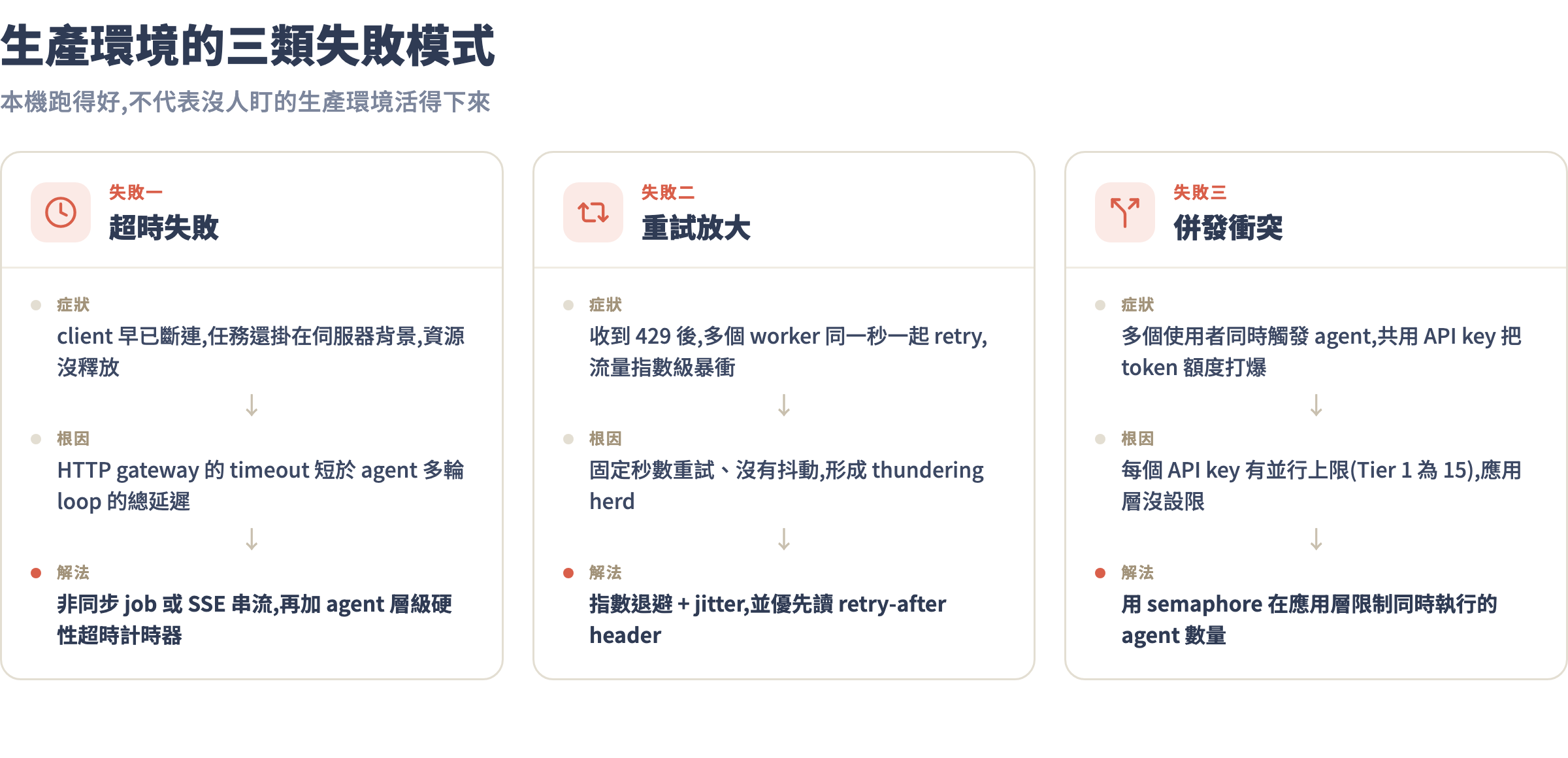
本機跑 agent 時,你盯著螢幕等,超時了就 Ctrl+C 重跑。生產環境沒有人盯:request 可能在伺服器裡掛著,client 早已超時斷連;rate limit 被打到,自動重試反而讓情況更糟;多個使用者同時觸發 agent,共享同一個 API key 把 token 額度打爆。
超時設計
Claude API 的 P99 延遲在 Sonnet 4.6 上約 8-15 秒(單次 API call,不計工具執行)。一個 agent 跑 10 個 loop,光 API 延遲就可能超過 100 秒。你的 HTTP gateway 如果設 30 秒 timeout,agent 幾乎一定被截斷。
兩種正確做法擇一:
- 非同步 job 模式:接到請求立即回
{"job_id": "xxx", "status": "running"},client 輪詢或 webhook 通知結果。超時問題從根本消失。 - Server-Sent Events (SSE) streaming:agent 每個 loop 的中間結果即時推送給 client。使用者看到進度,不會因為沒回應而以為掛掉。
兩種模式都要設 agent 層級的硬性超時——不是 HTTP timeout,而是 agent 自己的計時器:
import asyncio

async def run_agent_with_timeout(task: str, timeout_seconds: int = 300):
    """超過 timeout_seconds 秒強制停止 agent"""
    try:
        result = await asyncio.wait_for(
            run_agent(task),
            timeout=timeout_seconds
        )
        return result
    except asyncio.TimeoutError:
        return {
            "status": "timeout",
            "error": "Agent 超過時間限制(300 秒),任務未完成",
            "hint": "可以把任務拆成更小的子任務重試"
        }
重試的正確姿勢
Claude API 會回 429 Too Many Requests(rate limit)和 529 Overloaded(服務繁忙)。兩種 error 都要重試,但不能所有 worker 同時重試——那只會讓情況更糟。
正確做法是指數退避加抖動(jitter):
import time
import random
import anthropic

def call_api_with_retry(client, max_retries=4, **kwargs):
    """帶指數退避的 API 呼叫,含 jitter 防止 thundering herd"""
    for attempt in range(max_retries):
        try:
            return client.messages.create(**kwargs)
        except anthropic.RateLimitError as e:
            if attempt == max_retries - 1:
                raise
            # 從 retry-after header 讀等待時間,沒有就自己算
            wait = float(e.response.headers.get("retry-after", 2 ** attempt))
            jitter = random.uniform(0, wait * 0.3)  # ±30% 隨機抖動
            print(f"Rate limit,等待 {wait + jitter:.1f} 秒後重試({attempt+1}/{max_retries})")
            time.sleep(wait + jitter)
        except anthropic.APIStatusError as e:
            if e.status_code == 529 and attempt < max_retries - 1:
                time.sleep(2 ** attempt + random.random())
            else:
                raise
併發上限
Anthropic API 每個 API key 預設最大並行 15 個請求(Tier 1)。多個 agent 同時跑很容易打到這個上限。用 semaphore 在應用層限制:
import asyncio

# 全域 semaphore:最多同時 10 個 agent(留 5 個給其他用途)
AGENT_SEMAPHORE = asyncio.Semaphore(10)

async def run_agent_safe(task: str):
    async with AGENT_SEMAPHORE:
        return await run_agent(task)
觀念二:成本控制四層防線
2026 年 7 月現況,Claude 主力模型的 API 定價如下:
| 模型 | Input($/M tokens) | Output($/M tokens) | 適用場景 |
|---|---|---|---|
| Haiku 4.5 | $1.00 | $5.00 | 分類、路由、簡單工具呼叫 |
| Sonnet 4.6 | $3.00 | $15.00 | 主力 agent 推理 |
| Opus 4.8 | $5.00 | $25.00 | 複雜多步驟規劃 |
| Fable 5 | $10.00 | $50.00 | 頂尖推理(謹慎用於 agent) |
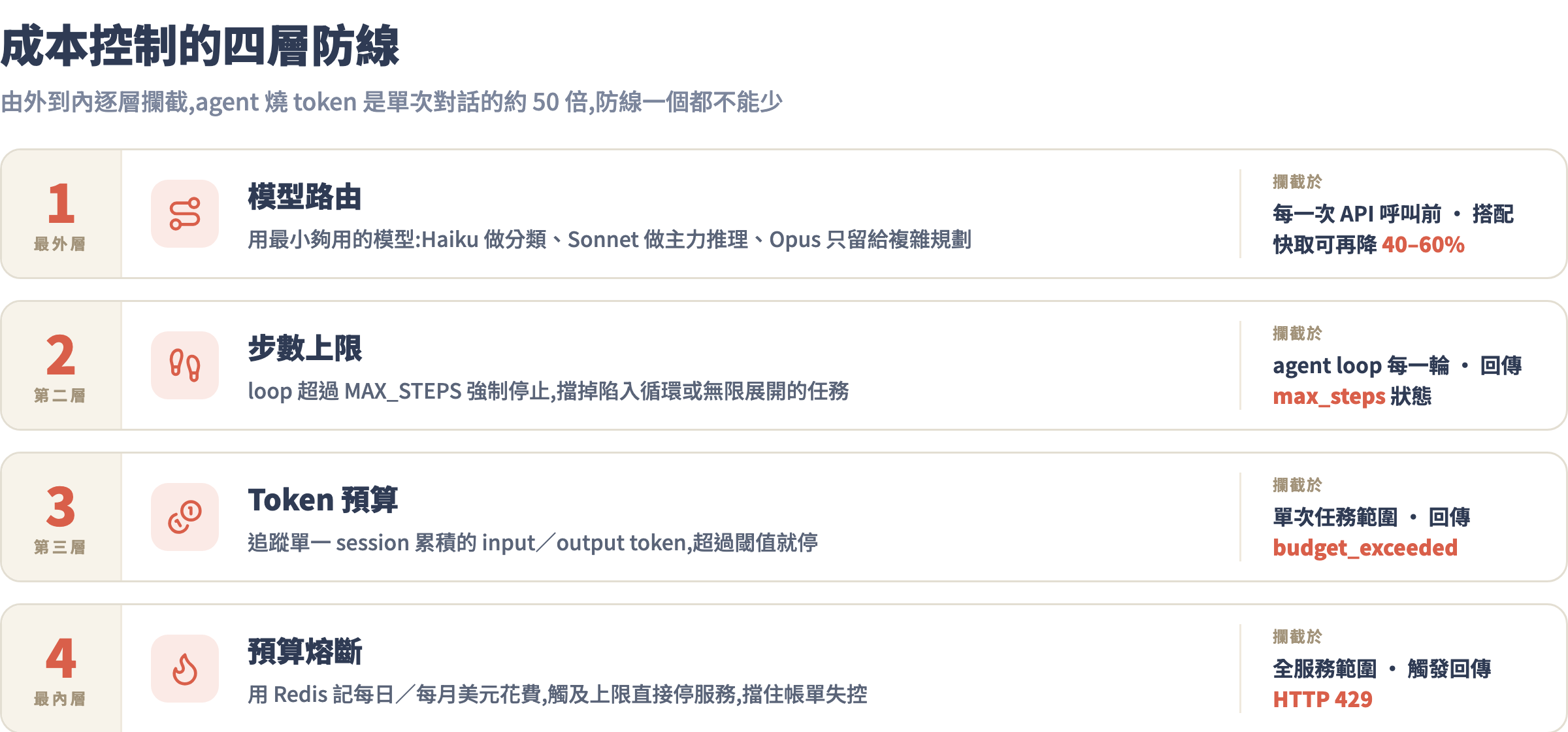
agent 平均消耗 token 量是單次對話的 50 倍(context 累積 + 工具呼叫開銷)。一個跑 20 個 loop 的 Opus agent,每次任務可能就燒掉 50 萬 token——0.25 美元。一天 1,000 次就是 250 美元,一個月就是 7,500 美元。
第一層:模型路由
不是每一步都需要 Opus。用 Haiku 做工具呼叫的參數解析、用 Sonnet 做主力推理、只在最終彙整或超複雜規劃時才動 Opus:
def pick_model(task_type: str) -> str:
    """根據任務型別選最便宜夠用的模型"""
    routing = {
        "classify": "claude-haiku-4-5",      # 分類路由
        "tool_call": "claude-haiku-4-5",     # 簡單工具呼叫
        "reason": "claude-sonnet-4-6",       # 主力推理
        "plan": "claude-opus-4-8",           # 複雜規劃(謹慎使用)
    }
    return routing.get(task_type, "claude-sonnet-4-6")
同時啟用 prompt caching:把 system prompt 和工具定義(通常是最長的 input 部分)標記為可快取。快取命中的 token 打九折,長 context 的 agent 整體成本可以降低 40-60%:
# system prompt 加 cache_control,讓它被快取
system = [
    {
        "type": "text",
        "text": "你是一個資料分析 agent...(很長的 system prompt)",
        "cache_control": {"type": "ephemeral"}  # 快取這一段
    }
]
第二層:步數上限
在 agent loop 裡加硬性計數器,超過就強制停止:
MAX_STEPS = 20  # 根據任務複雜度調整

step = 0
while True:
    step += 1
    if step > MAX_STEPS:
        return {
            "status": "max_steps_reached",
            "steps": step,
            "error": f"Agent 超過 {MAX_STEPS} 步上限。任務可能過於複雜或陷入循環。",
            "partial_result": last_response
        }
    response = call_api(...)
第三層:Token 預算
追蹤 session 累積的 token 消耗,超過就停:
class TokenBudget:
    def __init__(self, max_input: int = 500_000, max_output: int = 50_000):
        self.max_input = max_input
        self.max_output = max_output
        self.used_input = 0
        self.used_output = 0

    def track(self, response):
        self.used_input += response.usage.input_tokens
        self.used_output += response.usage.output_tokens

    def check(self) -> tuple[bool, str]:
        """回傳 (是否超預算, 說明)"""
        if self.used_input >= self.max_input:
            cost = self.used_input / 1e6 * 3 + self.used_output / 1e6 * 15  # Sonnet 定價
            return True, f"Input token 超過上限({self.used_input:,}/{self.max_input:,}),本次任務已消耗約 ${cost:.3f}"
        if self.used_output >= self.max_output:
            return True, f"Output token 超過上限({self.used_output:,}/{self.max_output:,})"
        return False, ""
第四層:預算熔斷
最後一道防線:每日美元上限。用 Redis 或簡單的檔案做持久化計數器,超過就停服務:
import redis
from datetime import datetime

r = redis.Redis()
DAILY_BUDGET_USD = 50.0  # 每日上限 50 美元

def check_daily_budget(cost_usd: float) -> bool:
    """回傳 True 代表預算充足,False 代表熔斷"""
    today_key = f"agent_cost:{datetime.now().strftime('%Y-%m-%d')}"
    current = float(r.get(today_key) or 0)

    if current + cost_usd > DAILY_BUDGET_USD:
        return False  # 熔斷

    r.incrbyfloat(today_key, cost_usd)
    r.expire(today_key, 86400 * 2)  # 保留 2 天
    return True
觀念三:安全最小原則
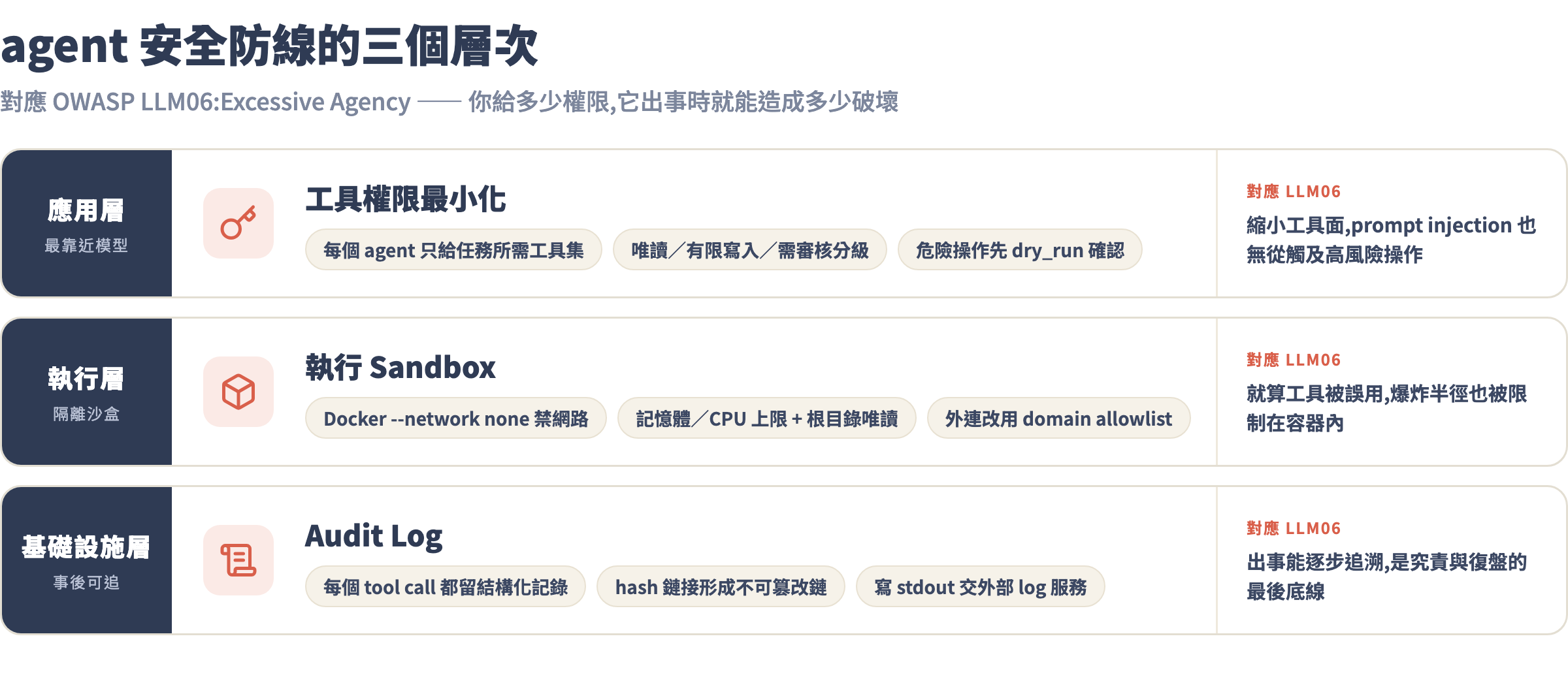
OWASP LLM Top 10 把 LLM06: Excessive Agency 列為高風險——agent 擁有超出任務所需的工具權限,一旦被 prompt injection 或模型誤判,後果就是你給了多少權限,它就能造成多少破壞。
工具權限最小化
開發時常見的錯誤是「先全部給,之後再收」——在生產環境這個「之後」往往不會到來。原則:每個 agent 只給完成任務所需的最小工具集。
# 壞的做法:把所有工具都給同一個 agent
all_tools = [
    read_file, write_file, delete_file,   # 檔案操作
    run_sql, drop_table, create_table,    # 資料庫操作
    send_email, call_api, browse_web      # 外部連線
]

# 好的做法:依 agent 職責切分工具集
REPORT_AGENT_TOOLS = [read_file, run_sql_readonly]        # 唯讀
WRITER_AGENT_TOOLS = [read_file, write_file]               # 有限寫入
ADMIN_AGENT_TOOLS  = [delete_file, drop_table, send_email] # 需審核才啟用
Sandbox 隔離
把 agent 跑在隔離的執行環境裡。最輕量的做法是用 Docker 搭配嚴格的資源限制:
docker run \
  --rm \
  --network none \                    # 禁止網路(除非工具需要)
  --memory="512m" \                   # 記憶體上限
  --cpus="1" \                        # CPU 上限
  --read-only \                       # 根目錄唯讀
  --tmpfs /tmp:size=100m \            # 只有 /tmp 可寫
  --security-opt no-new-privileges \  # 禁止提權
  my-agent:latest python agent.py
需要 agent 存取外部服務時,用 allowlist 限制可以連線的 domain,而不是開放整個網路:
ALLOWED_DOMAINS = {
    "api.github.com",
    "api.anthropic.com",
    "your-internal-db.company.com"
}

def safe_http_get(url: str) -> dict:
    from urllib.parse import urlparse
    domain = urlparse(url).netloc
    if domain not in ALLOWED_DOMAINS:
        return {
            "success": False,
            "error": "DOMAIN_NOT_ALLOWED",
            "message": f"domain {domain} 不在允許清單內",
            "hint": "如需新增 domain 請聯繫管理員"
        }
    # ... 真正的 HTTP 請求
Audit Log
每一個 tool call 都要留記錄,格式要結構化、不可篡改,出事才查得到原因:
import json
import time
import hashlib
from pathlib import Path

class AuditLogger:
    def __init__(self, log_dir: str = "./audit_logs"):
        self.log_dir = Path(log_dir)
        self.log_dir.mkdir(exist_ok=True)

    def log_tool_call(
        self,
        session_id: str,
        tool_name: str,
        tool_input: dict,
        tool_output: dict,
        user_id: str = None
    ):
        entry = {
            "timestamp": time.time(),
            "session_id": session_id,
            "user_id": user_id,
            "tool": tool_name,
            "input": tool_input,
            "output_summary": str(tool_output)[:500],  # 截斷避免 log 過大
            "output_success": tool_output.get("success", True)
        }
        # 用前一筆 hash 鏈接,形成簡單的不可篡改鏈
        entry_str = json.dumps(entry, ensure_ascii=False, sort_keys=True)
        entry["hash"] = hashlib.sha256(entry_str.encode()).hexdigest()[:16]

        log_file = self.log_dir / f"{time.strftime('%Y-%m-%d')}.jsonl"
        with open(log_file, 'a', encoding='utf-8') as f:
            f.write(json.dumps(entry, ensure_ascii=False) + "\n")
觀念四:監控指標設計
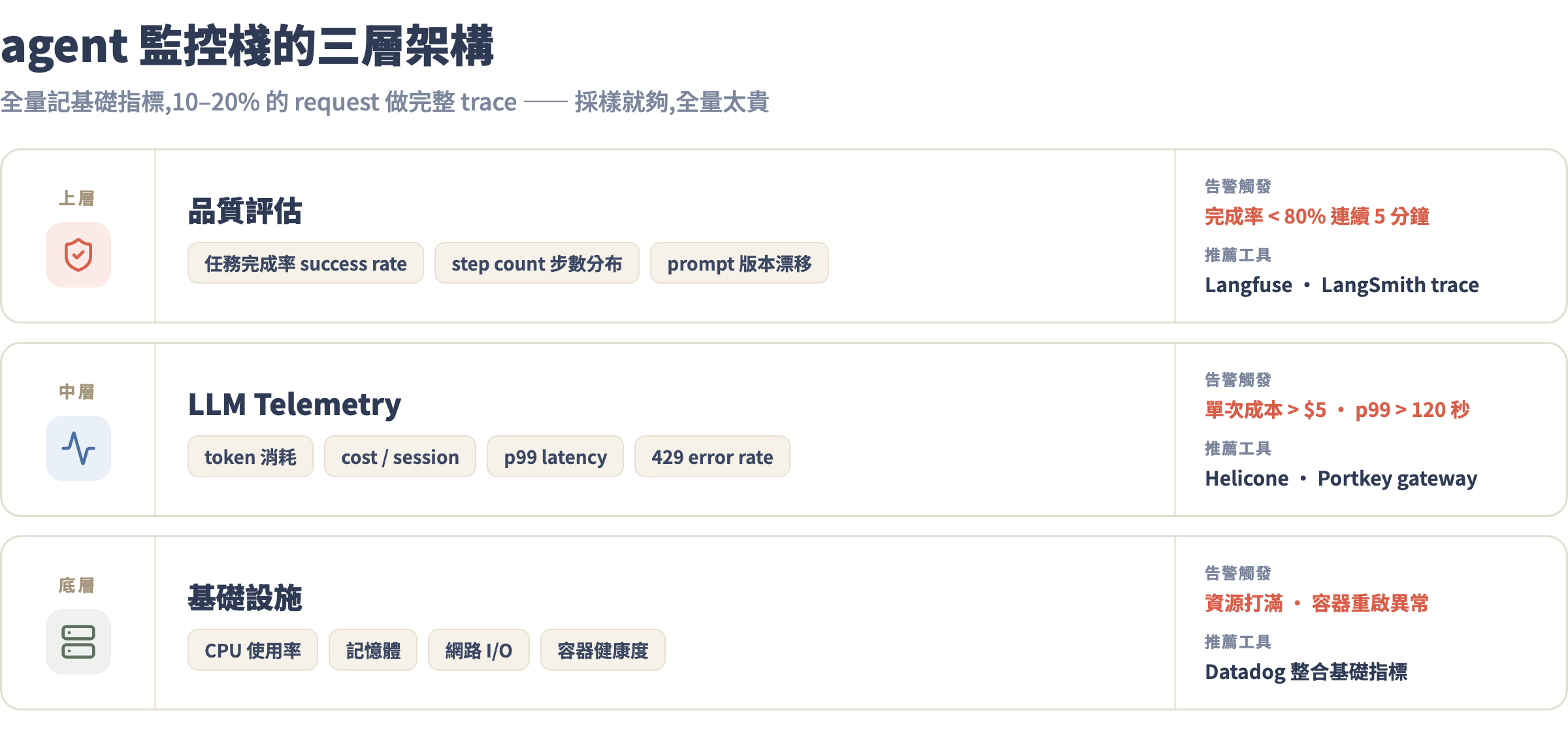
73% 的企業要求在生產環境監控 AI agent,但 63% 說沒有足夠工具。以下五個數字是最低限度的監控:
| 指標 | 說明 | 告警閾值範例 |
|---|---|---|
agent.cost_per_session_usd |
每次任務的美元成本 | > $1 → 警告,> $5 → 緊急 |
agent.steps_per_session |
每次任務的 loop 次數 | > 15 → 警告,= MAX_STEPS → 緊急 |
agent.success_rate |
任務完成率(非超時/熔斷) | < 80% 連續 5 分鐘 → 告警 |
agent.p99_latency_sec |
99th percentile 完成時間 | > 120 秒 → 警告 |
api.error_rate_429 |
rate limit 錯誤率 | > 5% → 調整併發設定 |
監控工具推薦:Langfuse 或 LangSmith 做 agent trace 追蹤(每個 tool call 都有 span),Helicone 或 Portkey 做 API gateway 層的成本追蹤,Datadog 整合 LLM metrics 和基礎設施指標。
重要原則:對全部 request 記錄基礎指標(token、成本、延遲),對 10-20% 的 request 做詳細 trace(完整的 tool call 序列)。全量詳細 trace 成本太高,採樣即可。
手把手實戰:把 agent 包成帶保護的 API
我們把一個 agent 包成 FastAPI 服務,含所有前面講的保護機制。
安裝依賴
pip install fastapi uvicorn anthropic redis python-dotenv
.env 檔:
ANTHROPIC_API_KEY=sk-ant-xxxx
DAILY_BUDGET_USD=50.0
MAX_STEPS=20
MAX_SESSION_INPUT_TOKENS=300000
核心 agent 包裝器
# agent_runner.py
import asyncio
import json
import time
import uuid
import anthropic
from dataclasses import dataclass, field
from typing import Optional

client = anthropic.Anthropic()

@dataclass
class AgentRunResult:
    session_id: str
    status: str          # "success" | "timeout" | "max_steps" | "budget_exceeded" | "error"
    result: Optional[str] = None
    steps: int = 0
    total_cost_usd: float = 0.0
    error: Optional[str] = None

TOOLS = [
    # 這裡放你在第 2、3 課設計好的工具定義
    # 範例:只放唯讀工具
    {
        "name": "search_knowledge_base",
        "description": "在知識庫裡搜尋相關資訊,回傳最多 5 筆結果。",
        "input_schema": {
            "type": "object",
            "properties": {
                "query": {"type": "string", "description": "搜尋關鍵字"},
                "limit": {"type": "integer", "description": "最多回傳幾筆,預設 5", "default": 5}
            },
            "required": ["query"]
        }
    }
]

def execute_tool(name: str, tool_input: dict) -> dict:
    """工具執行入口,實際實作請替換"""
    if name == "search_knowledge_base":
        # 實際實作:查向量資料庫、搜尋引擎等
        return {"success": True, "results": [{"title": "範例", "content": "..."}]}
    return {"success": False, "error": "UNKNOWN_TOOL"}

# Sonnet 4.6 定價(2026/07)
COST_PER_M_INPUT  = 3.0
COST_PER_M_OUTPUT = 15.0

async def run_agent(
    task: str,
    session_id: str,
    max_steps: int = 20,
    max_input_tokens: int = 300_000,
    timeout_seconds: int = 300
) -> AgentRunResult:
    """帶全套保護的 agent runner"""

    messages = [{"role": "user", "content": task}]
    steps = 0
    total_input = 0
    total_output = 0
    audit = AuditLogger()

    system = "你是一個知識庫查詢 agent。只使用提供的工具回答問題,不要編造資訊。"

    try:
        async with asyncio.timeout(timeout_seconds):
            while True:
                steps += 1

                # 第二層:步數上限
                if steps > max_steps:
                    return AgentRunResult(
                        session_id=session_id,
                        status="max_steps",
                        steps=steps,
                        total_cost_usd=(total_input / 1e6 * COST_PER_M_INPUT
                                       + total_output / 1e6 * COST_PER_M_OUTPUT),
                        error=f"超過步數上限 {max_steps}"
                    )

                # 第三層:Token 預算
                if total_input >= max_input_tokens:
                    return AgentRunResult(
                        session_id=session_id,
                        status="budget_exceeded",
                        steps=steps,
                        total_cost_usd=total_input / 1e6 * COST_PER_M_INPUT,
                        error=f"Input token 超過 {max_input_tokens:,} 上限"
                    )

                response = call_api_with_retry(
                    client,
                    model="claude-sonnet-4-6",
                    max_tokens=4096,
                    system=system,
                    tools=TOOLS,
                    messages=messages
                )

                total_input  += response.usage.input_tokens
                total_output += response.usage.output_tokens

                if response.stop_reason == "end_turn":
                    final_text = next(
                        (b.text for b in response.content if hasattr(b, "text")), ""
                    )
                    return AgentRunResult(
                        session_id=session_id,
                        status="success",
                        result=final_text,
                        steps=steps,
                        total_cost_usd=(total_input / 1e6 * COST_PER_M_INPUT
                                       + total_output / 1e6 * COST_PER_M_OUTPUT)
                    )

                # 處理工具呼叫
                tool_results = []
                for block in response.content:
                    if block.type == "tool_use":
                        output = execute_tool(block.name, block.input)
                        audit.log_tool_call(session_id, block.name, block.input, output)
                        tool_results.append({
                            "type": "tool_result",
                            "tool_use_id": block.id,
                            "content": json.dumps(output, ensure_ascii=False)
                        })

                messages.append({"role": "assistant", "content": response.content})
                messages.append({"role": "user", "content": tool_results})

    except asyncio.TimeoutError:
        return AgentRunResult(
            session_id=session_id,
            status="timeout",
            steps=steps,
            error=f"超過 {timeout_seconds} 秒時間限制"
        )
    except Exception as e:
        return AgentRunResult(
            session_id=session_id,
            status="error",
            steps=steps,
            error=str(e)
        )
FastAPI 路由 + 預算熔斷
# main.py
import os
from fastapi import FastAPI, HTTPException, Header
from pydantic import BaseModel
import redis
from datetime import datetime

app = FastAPI()
r = redis.Redis(decode_responses=True)

DAILY_BUDGET_USD = float(os.getenv("DAILY_BUDGET_USD", 50.0))

class AgentRequest(BaseModel):
    task: str
    user_id: str = "anonymous"

def check_and_record_budget(cost_usd: float) -> bool:
    """第四層:每日預算熔斷。回傳 False 代表熔斷"""
    today_key = f"budget:{datetime.now().strftime('%Y-%m-%d')}"
    current = float(r.get(today_key) or 0)
    if current + cost_usd > DAILY_BUDGET_USD:
        return False
    r.incrbyfloat(today_key, cost_usd)
    r.expire(today_key, 172800)  # TTL 2 天
    return True

@app.post("/agent/run")
async def run_agent_endpoint(req: AgentRequest):
    # 先檢查今日預算是否還有餘裕(用 $0 check 剩餘空間)
    today_key = f"budget:{datetime.now().strftime('%Y-%m-%d')}"
    used = float(r.get(today_key) or 0)
    if used >= DAILY_BUDGET_USD:
        raise HTTPException(
            status_code=429,
            detail=f"今日 agent 預算已用盡(${used:.2f}/${DAILY_BUDGET_USD:.2f}),請明日再試"
        )

    session_id = f"{req.user_id}-{int(datetime.now().timestamp())}"

    result = await run_agent(
        task=req.task,
        session_id=session_id,
        max_steps=int(os.getenv("MAX_STEPS", 20)),
        max_input_tokens=int(os.getenv("MAX_SESSION_INPUT_TOKENS", 300_000))
    )

    # 記錄本次成本
    if result.total_cost_usd > 0:
        check_and_record_budget(result.total_cost_usd)

    return {
        "session_id": result.session_id,
        "status": result.status,
        "result": result.result,
        "steps": result.steps,
        "cost_usd": round(result.total_cost_usd, 4),
        "error": result.error
    }

@app.get("/agent/budget")
async def get_budget_status():
    today_key = f"budget:{datetime.now().strftime('%Y-%m-%d')}"
    used = float(r.get(today_key) or 0)
    return {
        "date": datetime.now().strftime('%Y-%m-%d'),
        "used_usd": round(used, 4),
        "budget_usd": DAILY_BUDGET_USD,
        "remaining_usd": round(DAILY_BUDGET_USD - used, 4),
        "is_active": used < DAILY_BUDGET_USD
    }
跑起來測試
# 確保 Redis 跑著(或用 docker)
docker run -d -p 6379:6379 redis:alpine

# 啟動 FastAPI
uvicorn main:app --reload --port 8000

# 測試
curl -X POST http://localhost:8000/agent/run \
  -H "Content-Type: application/json" \
  -d '{"task": "幫我查詢 Claude API 的定價資訊", "user_id": "user123"}'

# 查看今日預算消耗
curl http://localhost:8000/agent/budget
回應範例:
{
  "session_id": "user123-1751644800",
  "status": "success",
  "result": "根據知識庫資訊...",
  "steps": 3,
  "cost_usd": 0.0087,
  "error": null
}
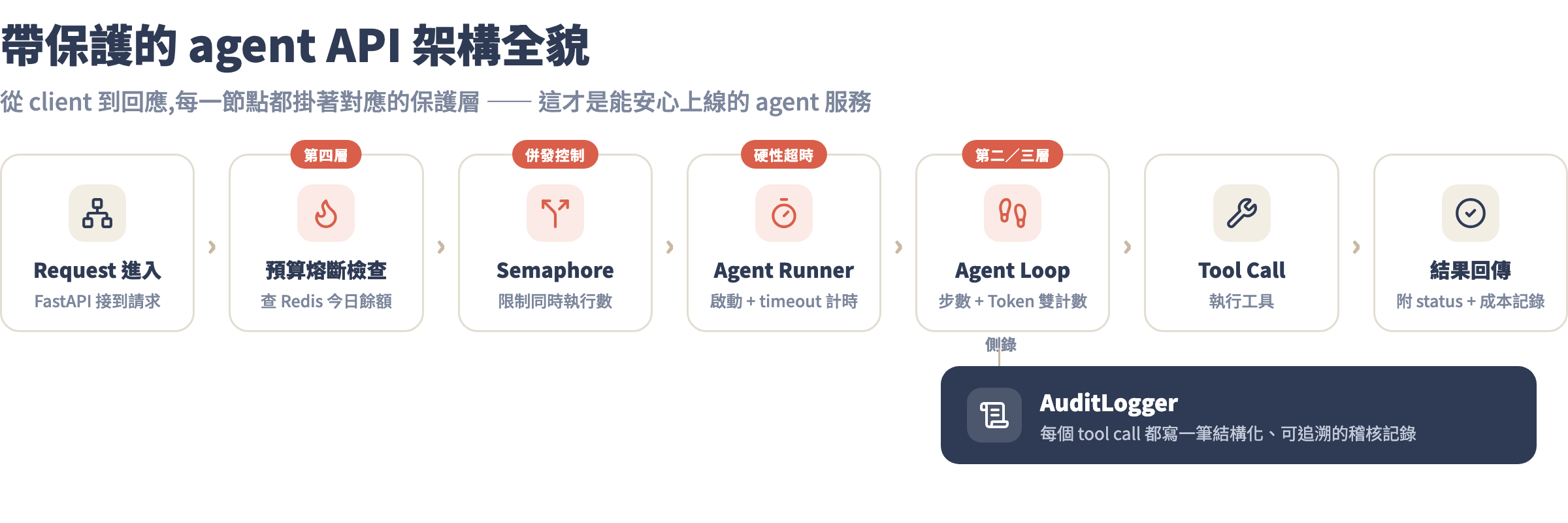
常見坑
坑 1:asyncio.timeout 在 Jupyter 裡失效,agent 一直跑
症狀:你在 notebook 裡測試,設了 300 秒 timeout,但 agent 跑了 10 分鐘還沒停。
根因:asyncio.timeout 需要在 async context 裡才能運作;Jupyter 的 event loop 在某些情況下不會正確傳遞取消信號給同步的 time.sleep 呼叫。
解法:在 notebook 測試時改用 threading 的 timeout 或 concurrent.futures.ThreadPoolExecutor 搭配 future.result(timeout=...):
from concurrent.futures import ThreadPoolExecutor, TimeoutError

with ThreadPoolExecutor(max_workers=1) as executor:
    future = executor.submit(run_agent_sync, task)
    try:
        result = future.result(timeout=300)
    except TimeoutError:
        print("Agent 超時了")
坑 2:agent 每次 loop 都拿到 429,重試三次後把錯誤回給使用者
症狀:使用者收到 {"error": "RateLimitError: 429 Too Many Requests"},但其實等 30 秒就能繼續。
根因:retry 邏輯裡的 max_retries 設太低,或 retry-after header 沒有被正確讀取,導致等待時間不夠、仍然拿到 429。
具體錯誤:
anthropic.RateLimitError: Error code: 429 - {'type': 'error', 'error':
{'type': 'rate_limit_error', 'message': 'Number of request tokens has
exceeded your per-minute rate limit (https://docs.anthropic.com/...'}}
解法:一定要讀 retry-after header,不要用固定秒數:
# 錯的:固定等 5 秒
time.sleep(5)

# 對的:讀 header 或指數退避
wait = float(e.response.headers.get("retry-after", 2 ** attempt))
time.sleep(wait + random.uniform(0, 1))
另外:不同類型的 429 要分開處理——token rate limit(ITPM)和 request rate limit(RPM)的 retry-after 值不同,前者通常只需要等幾秒,後者可能要等一分鐘。
坑 3:audit log 寫到磁碟,agent 容器重啟後 log 全部消失
症狀:agent 在容器裡跑,出事要查 log 時發現日誌全空,因為容器用的是 ephemeral storage。
解法有兩個層次:
- 短期:mount volume 讓 log 持久化:
-v /host/audit_logs:/app/audit_logs - 長期:改用外部 log 服務(CloudWatch、Datadog Logs、或寫到 PostgreSQL)而不是本機檔案。容器應該把 log 寫到 stdout,由 container runtime 收集後送外部:
import sys
import json

def log_to_stdout(entry: dict):
    """結構化 log 寫到 stdout,讓 container runtime 收集"""
    print(json.dumps(entry, ensure_ascii=False), file=sys.stdout, flush=True)
坑 4:每日預算 key 在 UTC 午夜重置,但你的 server 在台灣時間
症狀:台灣時間每天早上 8 點,前一天的預算就被重置——因為 UTC 0:00 = 台灣 8:00,Redis key 的 TTL 在台灣清晨就到期了。
解法:key 命名改用台灣時間:
from datetime import datetime, timezone, timedelta

TW_TZ = timezone(timedelta(hours=8))

def today_budget_key() -> str:
    tw_now = datetime.now(TW_TZ)
    return f"budget:{tw_now.strftime('%Y-%m-%d')}"
坑 5:agent 步數超限回傳了 partial_result,前端直接顯示給使用者
症狀:使用者看到一半的、不完整的答案,甚至是模型的中間推理過程(「讓我先搜尋 A,再搜尋 B...」),誤以為這是最終答案。
解法:API 的 response 要明確區分 status,前端要根據 status 決定顯示邏輯:
// API 回傳的 JSON
// {"status": "max_steps", "result": null, "error": "超過步數上限", ...}

// 前端邏輯
if (response.status !== "success") {
  showError("此任務太複雜,請把問題拆小後重試");
  return;
}
showResult(response.result);
作業
- 把本課的 FastAPI 包裝器在本機跑起來,設定
DAILY_BUDGET_USD=1(一塊美元),故意跑幾個 session 觸發熔斷,確認熔斷後/agent/run回傳429而不是繼續跑。 - 打開
audit_logs/目錄,手動查看某一次任務的 tool call 序列——能追溯每一步是好的 audit log 的基本要求。 - 選做:在 Langfuse 建立免費帳號,把每個 API call 的 usage token 傳過去,看成本隨時間的走勢圖。這個習慣從第一天就建立,之後 debug 成本異常時才能有 trace 可查。
下一課預告
第 6 課把保護機制都裝好了——agent 不會失控跑爆帳單、出事有 log 可查。下一課是整個課程的綜合實戰:用你前六課學到的所有技巧,從零做出一個自動研究報告 Agent:接收一個研究主題,自動拆解子問題、並行搜尋、彙整來源、產出帶引用的完整報告。會看到 orchestrator-subagent 架構在真實任務裡怎麼組合,以及如何把第 5 課學到的評估機制接進去,讓輸出品質可量化。這是你的畢業作品,也是一個可以直接拿去用的生產工具。