 精華筆記
精華筆記 結構化輸出:保證拿到合法 JSON
你花了半天把 Claude 對接進自己的產品,程式跑起來了,但三天後客戶回報說某筆資料壞掉了。你追查一輪,發現問題在這裡:Claude 這次回了一個 JSON,但外面多包了一層 markdown code fence——你的 json.loads() 直接爆掉,資料就靜靜地丟失了,沒有任何警告。
這不是 Claude 的 bug,這是「用提示詞要求 JSON 輸出」的先天缺陷。模型不是規則引擎,它輸出的是「看起來像 JSON 的文字」,不是「保證合法的 JSON」。現在有了更好的解法——2025 年 11 月 Anthropic 正式推出 Structured Outputs,讓你傳入一份 JSON Schema,Claude 在 token 層級就被鎖死在這個格式裡輸出,從根本上杜絕格式不合法的問題。
這堂學什麼
- 為什麼「在 prompt 裡說請輸出 JSON」不可靠,以及它會在哪些情況下失敗
- Structured Outputs 的底層原理:constrained decoding 是什麼
- JSON Schema 核心語法速查:type、properties、required、additionalProperties
- 用
output_config.format呼叫 Structured Outputs(Python 與 JavaScript 雙語) - Pydantic / Zod 型別整合:讓回應直接是你定義的 Python class 或 TypeScript 型別
- 實戰:文本抽取結構化資料 API——從一段新聞稿抽出公司名、數字、日期
觀念一:舊法哪裡脆
在 Structured Outputs 推出之前,要讓 Claude 輸出 JSON,幾乎人人都用這個做法:在 system prompt 裡加一句「請一律以 JSON 格式回覆」或「請輸出格式如下:{...}」。這個方法在大多數情況下能跑,但它在以下幾個場景下特別容易出問題:
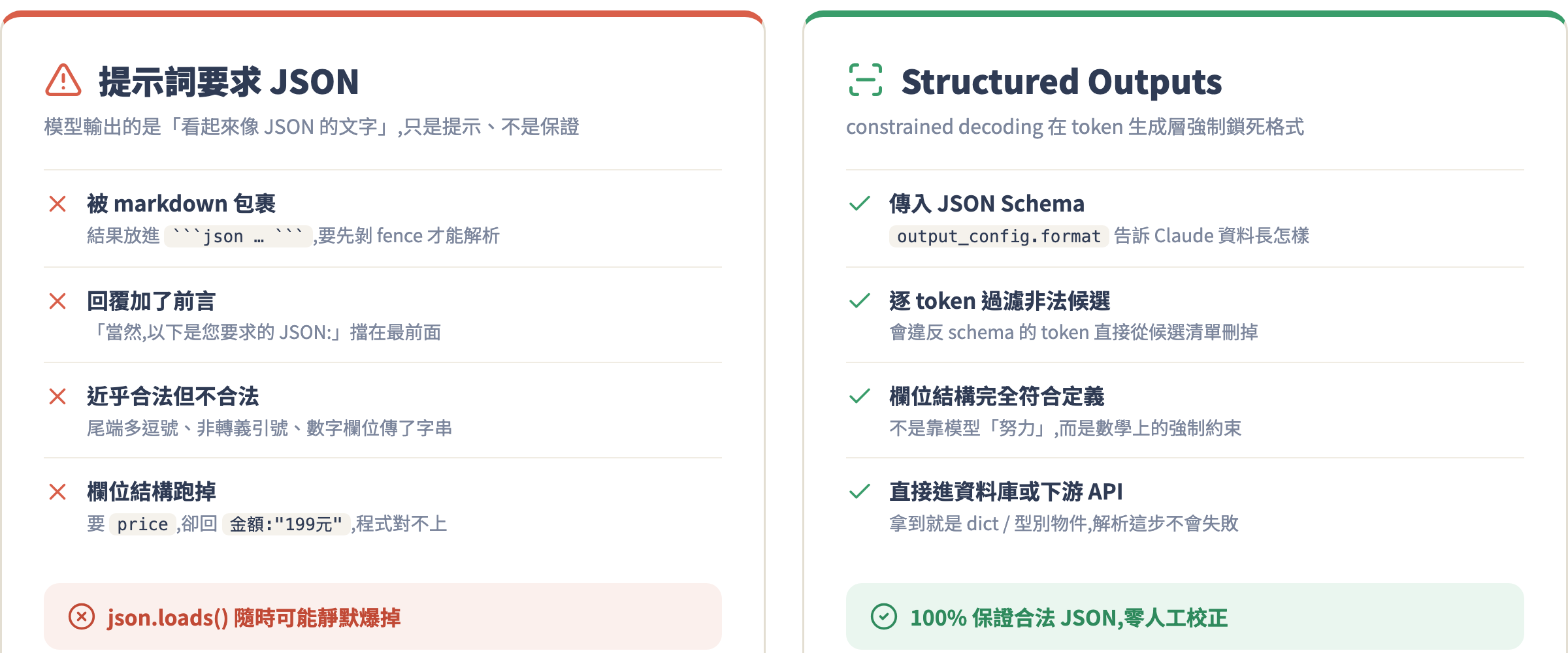
情境一:回覆加了前言。 Claude 有時候會在 JSON 之前加上「當然,以下是您要求的 JSON:」,然後才是實際內容。你的 json.loads() 直接炸。
情境二:被 markdown 包裹。 模型把 JSON 放進 ```json ... ``` 的 code fence 裡,因為它覺得「這樣比較好看」。你必須先把前後的 fence 剝掉才能解析。
情境三:近乎合法但就是不合法。 尾端多一個逗號、字串裡有非轉義的引號、數字欄位傳了字串——這些在語意上沒問題,但 JSON 解析器不管語意,只管語法,一個字元不對就丟 exception。
情境四:欄位結構跑掉。 你要的是 { "price": 199, "currency": "TWD" },Claude 有時候回 { "金額": "199元台幣" }——語意相同,但你的程式完全對不上。
這些問題的根源是一樣的:模型輸出是機率性的「文字」,你在 prompt 裡說要 JSON 只是給了個提示,不是給了個保證。真正的保證需要在 token 生成層面下手。
觀念二:constrained decoding——從根源保證格式
Structured Outputs 的底層機制叫做 constrained decoding。簡單說:在模型生成每個 token 時,系統會比對你傳入的 JSON Schema,把所有「如果接上去就會違反 schema」的 token 直接從候選清單裡刪掉。
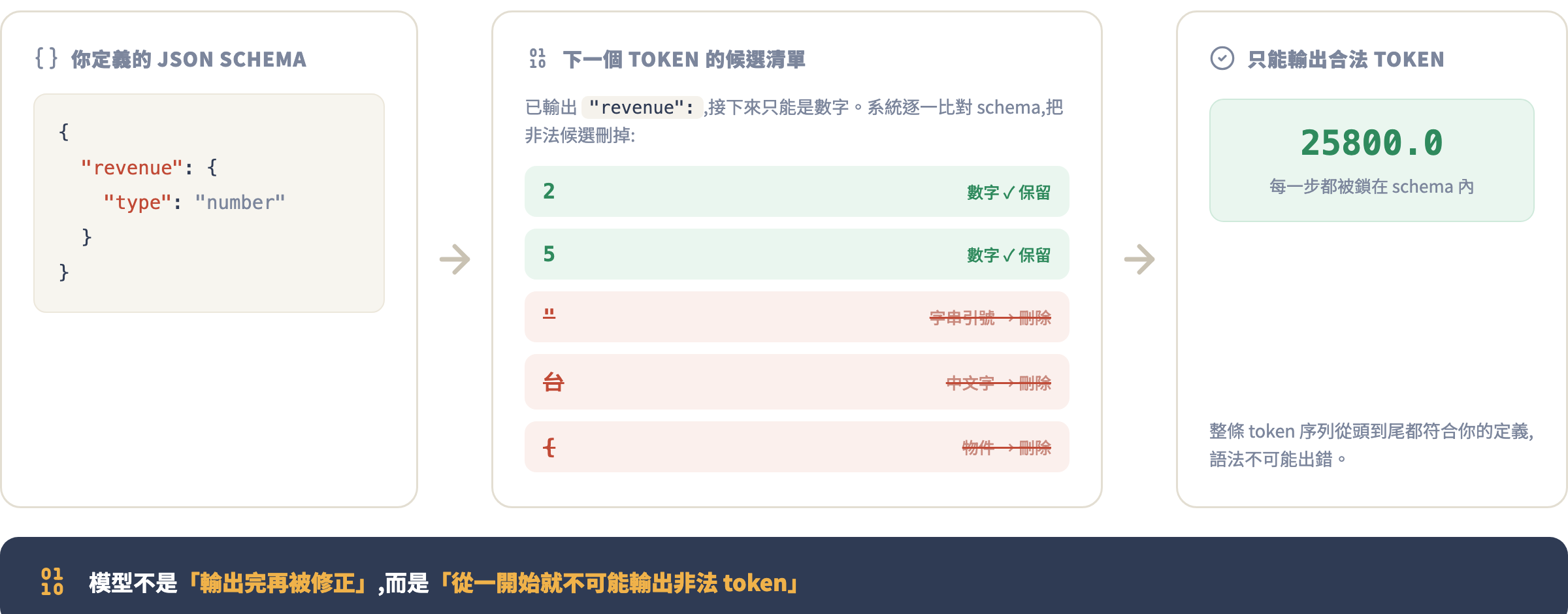
換句話說,模型不是「輸出完再被修正」,而是「從一開始就只能輸出符合你 schema 的 token 序列」。這就是為什麼 Structured Outputs 能夠 100% 保證輸出是合法 JSON,並且欄位結構完全符合你定義的 schema——這不是靠模型的「努力」,而是靠數學上的強制約束。
Structured Outputs 在 2025 年 11 月 14 日推出公開測試,現在已是 GA(正式可用)狀態,支援 Claude Haiku 4.5、Sonnet 4.6、Opus 4.8 以及更新的模型。
觀念三:JSON Schema 速查
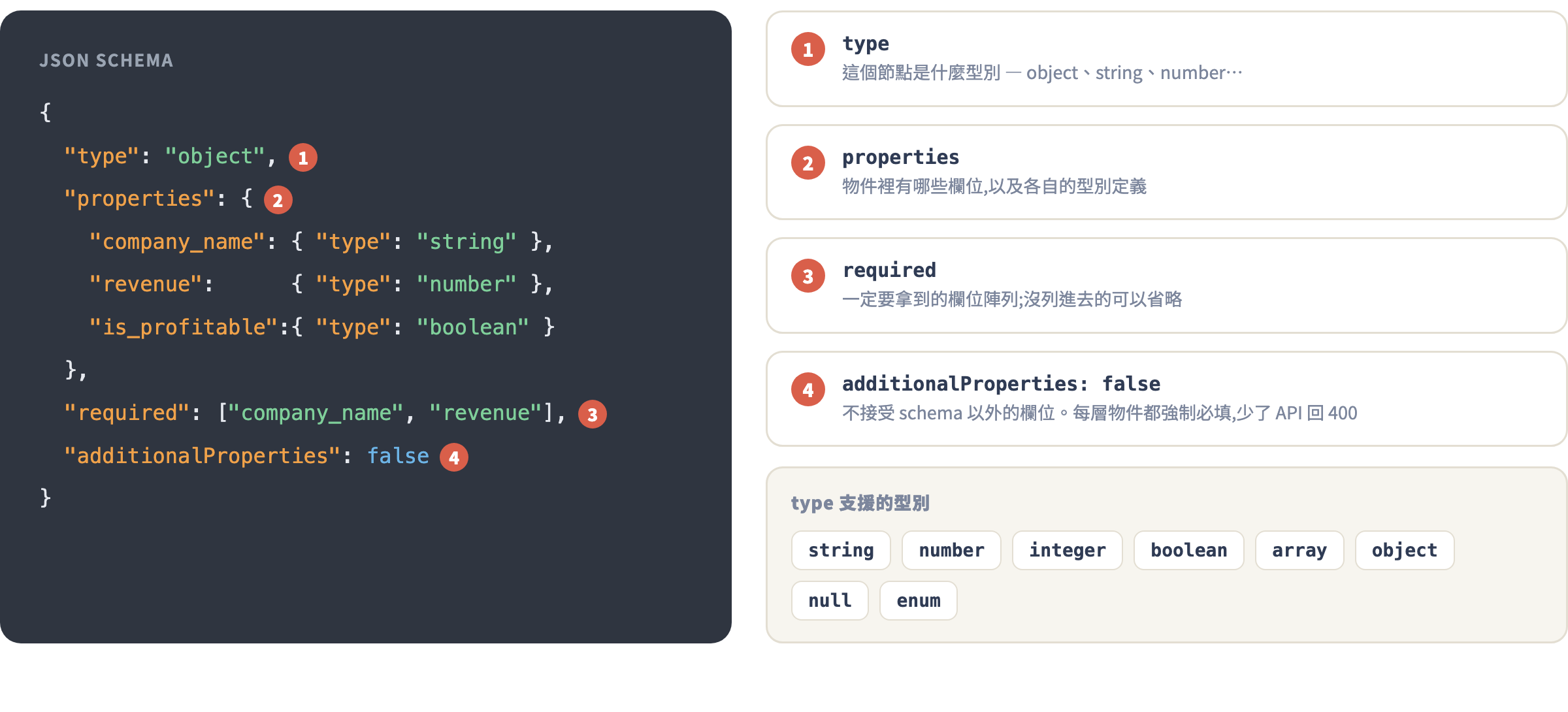
使用 Structured Outputs 需要你自己定義一份 JSON Schema,告訴 Claude 輸出的資料長什麼樣。大部分場景你只需要五個關鍵字:
{
  "type": "object",
  "properties": {
    "company_name": { "type": "string" },
    "revenue": { "type": "number" },
    "is_profitable": { "type": "boolean" },
    "founded_year": { "type": "integer" },
    "tags": {
      "type": "array",
      "items": { "type": "string" }
    }
  },
  "required": ["company_name", "revenue", "is_profitable"],
  "additionalProperties": false
}
幾個重點說清楚:
type支援:string、number(含小數)、integer(整數)、boolean、array、object、nullrequired是一個陣列,列出你一定要拿到的欄位;沒列進去的欄位 Claude 可以省略additionalProperties: false是強制必填,少了它 API 會報錯。意思是「不接受 schema 以外的欄位」- 你也可以用
enum限制值的範圍,例如{ "type": "string", "enum": ["pending", "approved", "rejected"] }
特別注意幾個不支援的語法,寫了會讓 API 回 400 錯誤:
minimum、maximum、minLength、maxLength這類數值/字串約束- 遞迴 schema(一個物件的欄位指向自己)
additionalProperties: true(不能允許任意欄位)
手把手實戰
以下用「從新聞稿抽取公司財務資訊」為主軸,從最基本的呼叫方式逐步帶到實戰。
最基本的 Structured Outputs 呼叫
重點在於加入 output_config 參數,其他地方跟一般 messages.create() 完全一樣:
Python:
import anthropic
import json

client = anthropic.Anthropic()  # 自動讀取 ANTHROPIC_API_KEY

# 定義你要的輸出結構
schema = {
    "type": "object",
    "properties": {
        "company_name": {"type": "string"},
        "revenue_million_usd": {"type": "number"},
        "yoy_growth_pct": {"type": "number"},
        "is_profitable": {"type": "boolean"},
        "fiscal_quarter": {"type": "string"}
    },
    "required": [
        "company_name", "revenue_million_usd",
        "yoy_growth_pct", "is_profitable", "fiscal_quarter"
    ],
    "additionalProperties": False  # Python 用 False(大寫)
}

news_text = """
台積電今日公布 2026 年第一季財報,合併營收達 8,350 億新台幣(約 258 億美元),
較去年同期成長 41.6%。單季淨利為 3,615 億新台幣,創歷史新高。
"""

response = client.messages.create(
    model="claude-sonnet-4-6",
    max_tokens=512,
    system="你是一位財務資料抽取 AI。從用戶提供的新聞稿中,抽取指定的結構化財務資訊。",
    messages=[
        {"role": "user", "content": f"請從以下新聞稿抽取財務資訊:\n\n{news_text}"}
    ],
    output_config={
        "format": {
            "type": "json_schema",
            "schema": schema
        }
    }
)

# 回應在 response.content[0].text,是一個 JSON 字串,直接解析即可
data = json.loads(response.content[0].text)
print(data)
# {"company_name": "台積電", "revenue_million_usd": 25800.0, "yoy_growth_pct": 41.6, "is_profitable": true, "fiscal_quarter": "2026 Q1"}
JavaScript/TypeScript:
import Anthropic from "@anthropic-ai/sdk";

const client = new Anthropic();

const schema = {
  type: "object" as const,
  properties: {
    company_name: { type: "string" as const },
    revenue_million_usd: { type: "number" as const },
    yoy_growth_pct: { type: "number" as const },
    is_profitable: { type: "boolean" as const },
    fiscal_quarter: { type: "string" as const }
  },
  required: ["company_name", "revenue_million_usd", "yoy_growth_pct", "is_profitable", "fiscal_quarter"],
  additionalProperties: false
};

const newsText = `
台積電今日公布 2026 年第一季財報,合併營收達 8,350 億新台幣(約 258 億美元),
較去年同期成長 41.6%。單季淨利為 3,615 億新台幣,創歷史新高。
`;

const response = await client.messages.create({
  model: "claude-sonnet-4-6",
  max_tokens: 512,
  system: "你是一位財務資料抽取 AI。從用戶提供的新聞稿中,抽取指定的結構化財務資訊。",
  messages: [
    { role: "user", content: `請從以下新聞稿抽取財務資訊:\n\n${newsText}` }
  ],
  output_config: {
    format: {
      type: "json_schema",
      schema
    }
  }
});

const data = JSON.parse(response.content[0].text);
console.log(data);
注意兩個細節:第一,回應拿到的是 response.content[0].text(字串),你還是要自己 json.loads() / JSON.parse() 一次——Structured Outputs 保證它一定合法,所以這步不會失敗;第二,schema 裡的 additionalProperties 在 Python 要寫 False(大寫),在 JSON 和 JS 裡寫 false。
Pydantic 型別整合(Python 推薦做法)
上面的方式每次都要手寫 schema dict,而且拿回來的是 dict,你後面存取欄位要用 data["company_name"] 而不是 data.company_name。用 Pydantic 可以解決這兩個問題:
from pydantic import BaseModel, Field
from anthropic import Anthropic

client = Anthropic()

class FinancialInfo(BaseModel):
    company_name: str = Field(description="公司名稱")
    revenue_million_usd: float = Field(description="季度營收,單位百萬美元")
    yoy_growth_pct: float = Field(description="年增率,百分比數字,不含 % 符號")
    is_profitable: bool = Field(description="本季是否獲利")
    fiscal_quarter: str = Field(description="財報季度,例如 2026 Q1")

news_text = """
台積電今日公布 2026 年第一季財報,合併營收達 8,350 億新台幣(約 258 億美元),
較去年同期成長 41.6%。單季淨利為 3,615 億新台幣,創歷史新高。
"""

# 用 .parse() 方法,傳入 Pydantic model class
response = client.messages.parse(
    model="claude-sonnet-4-6",
    max_tokens=512,
    system="你是一位財務資料抽取 AI。從用戶提供的新聞稿中,抽取指定的結構化財務資訊。",
    messages=[
        {"role": "user", "content": f"請從以下新聞稿抽取財務資訊:\n\n{news_text}"}
    ],
    output_format=FinancialInfo  # 直接傳 class,SDK 自動轉成 schema
)

# response.parsed_output 就是一個 FinancialInfo 實例,有完整型別提示
info = response.parsed_output
print(info.company_name)        # "台積電"
print(info.revenue_million_usd) # 25800.0
print(info.is_profitable)       # True
print(type(info))               # <class '__main__.FinancialInfo'>
兩個關鍵差異:第一,用 .parse() 而不是 .create();第二,用 output_format= 參數傳入 Pydantic class。SDK 會自動把 Pydantic model 轉成 JSON Schema 傳給 API,回應也會自動用 Pydantic 驗證並建構成物件。
Field(description="...") 是可選的,但強烈建議加——這段 description 會進入 schema 成為 API 的一部分,讓 Claude 更精確理解每個欄位的語意。
TypeScript Zod 整合
JavaScript 端對應的做法是用 Zod:
import Anthropic from "@anthropic-ai/sdk";
import { zodOutputFormat } from "@anthropic-ai/sdk/helpers/zod";
import { z } from "zod";

const client = new Anthropic();

const FinancialInfoSchema = z.object({
  company_name: z.string().describe("公司名稱"),
  revenue_million_usd: z.number().describe("季度營收,單位百萬美元"),
  yoy_growth_pct: z.number().describe("年增率,百分比數字,不含 % 符號"),
  is_profitable: z.boolean().describe("本季是否獲利"),
  fiscal_quarter: z.string().describe("財報季度,例如 2026 Q1")
});

type FinancialInfo = z.infer<typeof FinancialInfoSchema>;

const newsText = `
台積電今日公布 2026 年第一季財報,合併營收達 8,350 億新台幣(約 258 億美元),
較去年同期成長 41.6%。單季淨利為 3,615 億新台幣,創歷史新高。
`;

const response = await client.messages.parse({
  model: "claude-sonnet-4-6",
  max_tokens: 512,
  system: "你是一位財務資料抽取 AI。從用戶提供的新聞稿中,抽取指定的結構化財務資訊。",
  messages: [
    { role: "user", content: `請從以下新聞稿抽取財務資訊:\n\n${newsText}` }
  ],
  output_config: { format: zodOutputFormat(FinancialInfoSchema) }
});

// response.parsed_output 是完整型別的物件
const info: FinancialInfo = response.parsed_output;
console.log(info.company_name);         // "台積電"
console.log(info.revenue_million_usd);  // 25800
注意 JS 版用的是 output_config: { format: zodOutputFormat(...) } 而不是 output_format=——兩種語言的 API 略有不同,要看清楚。
實戰:處理巢狀結構與陣列欄位
真實場景往往需要更複雜的結構。假設你要從同一篇新聞稿同時抽取多個提到的公司,或是抽取帶有子物件的層次資料:
from pydantic import BaseModel, Field
from typing import Optional
from anthropic import Anthropic

client = Anthropic()

class Competitor(BaseModel):
    name: str = Field(description="競爭對手名稱")
    mentioned_revenue_billion_usd: Optional[float] = Field(
        default=None,
        description="如有提及營收,單位為十億美元;若未提及則為 null"
    )

class NewsAnalysis(BaseModel):
    primary_company: str = Field(description="新聞主角公司名稱")
    quarter: str = Field(description="財報季度")
    revenue_billion_usd: float = Field(description="主角公司營收,單位十億美元")
    yoy_growth_pct: float = Field(description="年增率,純數字")
    key_highlights: list[str] = Field(description="3 到 5 條重點摘要,每條一句話")
    competitors_mentioned: list[Competitor] = Field(
        default_factory=list,
        description="新聞中有被提及的競爭對手列表,若無則為空陣列"
    )

long_news = """
台積電今日公布 2026 年第一季財報,合併營收達 258 億美元,年增 41.6%。
單季淨利創歷史新高,毛利率維持在 58% 以上。
法說會上,台積電表示 AI 相關需求持續超出預期,先進製程訂單能見度已達年底。
三星電子同期財報出現虧損,英特爾晶圓代工部門營收約 45 億美元。
台積電預估次季營收將達 280-290 億美元,成長動能不減。
"""

response = client.messages.parse(
    model="claude-sonnet-4-6",
    max_tokens=1024,
    system="你是一位財務新聞分析 AI。從新聞稿中抽取結構化分析資料。",
    messages=[
        {"role": "user", "content": f"請分析以下新聞稿:\n\n{long_news}"}
    ],
    output_format=NewsAnalysis
)

result = response.parsed_output
print(result.primary_company)
print(result.key_highlights)           # ['AI 需求超預期', '毛利率 58% 以上', ...]
print(result.competitors_mentioned)    # [Competitor(name='三星電子', ...), ...]

# 存進資料庫或序列化
import json
print(result.model_dump_json(indent=2))
幾個在複雜 schema 裡的技巧:
- 用
Optional[float]+default=None讓欄位可以是 null,搭配 description 告訴 Claude 什麼時候填 null - 用
list[str]或list[Competitor]定義陣列欄位 - 用
default_factory=list讓 Claude 在沒有相關資訊時回傳空陣列而不是省略欄位 - Pydantic 的
.model_dump_json()可以直接序列化整個結果
常見坑
坑 1:忘記加 additionalProperties: false,API 回 400
Error: 400 {"type":"error","error":{"type":"invalid_request_error",
"message":"output_config.format.schema: additionalProperties must be false"}}
只要 schema 裡有 type: "object" 的物件(包含巢狀物件),每個物件層級都要加 "additionalProperties": false。這是 Structured Outputs 的強制要求。如果用 Pydantic,SDK 會自動處理這個,所以 Pydantic 方式比手寫 schema 更不容易踩到這坑。
坑 2:用了不支援的 schema 約束
Error: 400 {"type":"error","error":{"type":"invalid_request_error",
"message":"output_config.format.schema: minimum/maximum/minLength/maxLength not supported"}}
Structured Outputs 不支援數值或字串的長度/範圍約束。如果你的 schema 裡有 "minimum": 0、"maximum": 100 或 "minLength": 1,直接刪掉——你改用 description 告訴 Claude 期望的範圍就好,例如 "description": "必須是 0 到 100 之間的整數"。另外 additionalProperties: true 也不支援,只能是 false。
坑 3:stop_reason 是 "refusal" 但沒有攔截
response = client.messages.create(...)

# 以為這樣一定拿到 JSON,直接解析
data = json.loads(response.content[0].text)  # 可能炸
Structured Outputs 有一個例外:如果 Claude 基於安全考量拒絕回答,stop_reason 會是 "refusal" 而不是 "end_turn",這時 response.content[0].text 不是 JSON,你的解析就會失敗。另一個例外是 stop_reason: "max_tokens":token 被截斷,JSON 不完整,解析也會炸。正確的防禦寫法:
response = client.messages.create(
    model="claude-sonnet-4-6",
    max_tokens=1024,
    messages=[...],
    output_config={"format": {"type": "json_schema", "schema": schema}}
)

stop_reason = response.stop_reason

if stop_reason == "refusal":
    raise ValueError("模型拒絕回應此請求(安全考量)")
elif stop_reason == "max_tokens":
    raise ValueError("輸出被截斷,請增加 max_tokens 或縮小 schema")
elif stop_reason != "end_turn":
    raise ValueError(f"未預期的 stop_reason: {stop_reason}")

data = json.loads(response.content[0].text)
使用 Pydantic .parse() 時,SDK 會自動在 refusal 時拋出 anthropic.APIStatusError,可以直接 try/except 攔截。
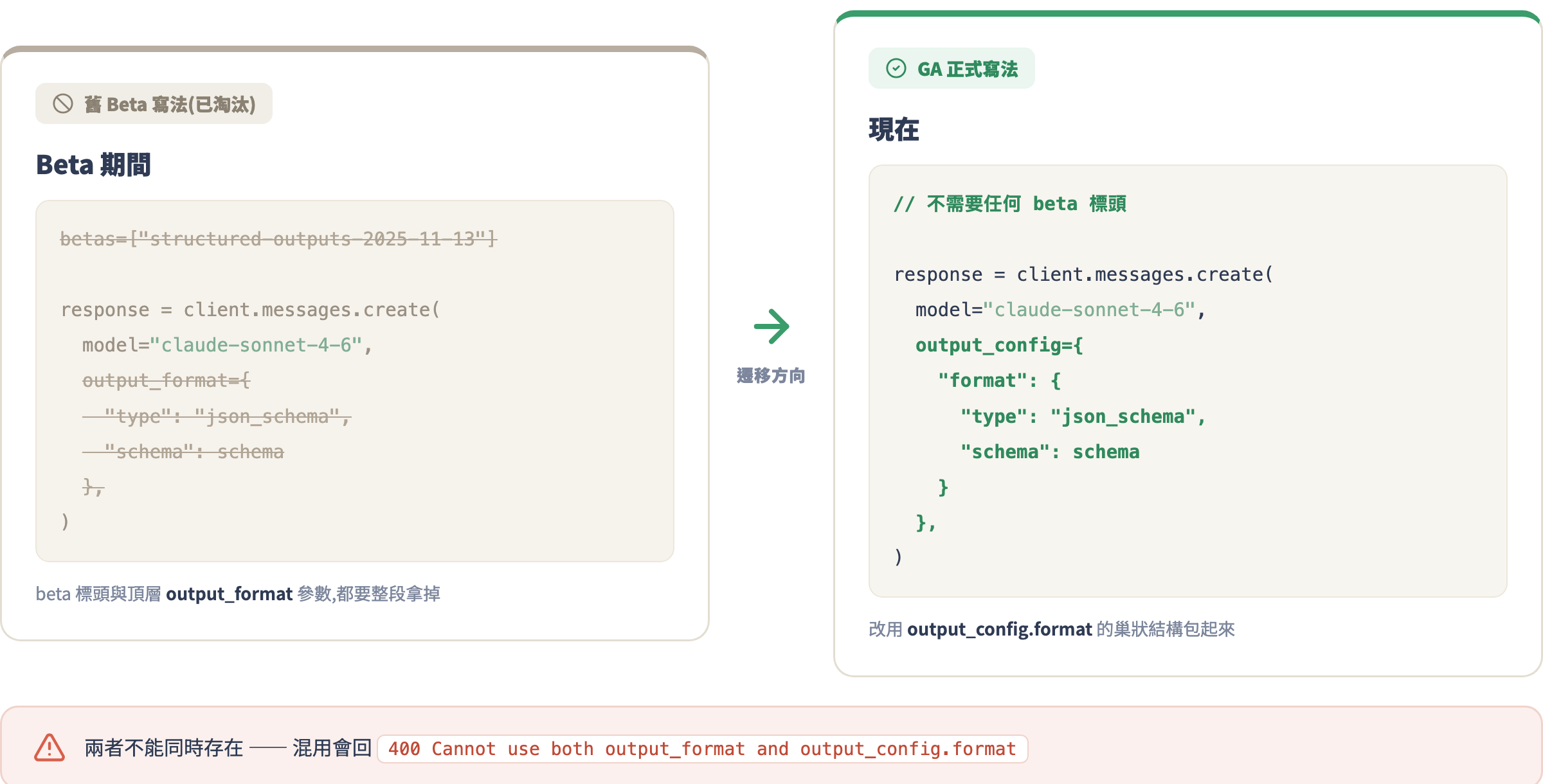
坑 4:用了舊的 beta header 但混用新參數
Error: 400 Cannot use both output_format and output_config.format
Structured Outputs 在 beta 期間的舊參數是 output_format(直接放在 messages.create() 的頂層),現在 GA 後改成 output_config.format。這兩個不能同時用。如果你是從舊教學或文章複製的程式碼,請把 output_format 整個換成 output_config: {"format": ...} 的結構;同時把 betas=["structured-outputs-2025-11-13"] 這行也刪掉——GA 版不需要 beta header。
坑 5:把文字推理欄位硬塞進 schema
有些人會在 schema 裡加 "reasoning" 或 "thinking" 欄位,想讓 Claude 同時輸出分析過程和結論。這沒有問題,但要注意:這些文字欄位會消耗大量 token,max_tokens 要設得夠大;而且如果 schema 設計不好(欄位定義不清),模型有時候會把大篇幅的推理文字塞在一個 string 欄位裡讓欄位爆長。建議把「推理」和「結論」拆開,或者乾脆不要在 Structured Outputs 裡放推理欄位——讓 Claude 在 system prompt 裡先用文字推理,再輸出結構化結論是更乾淨的做法。
這節課的定位:一次就做對的基礎
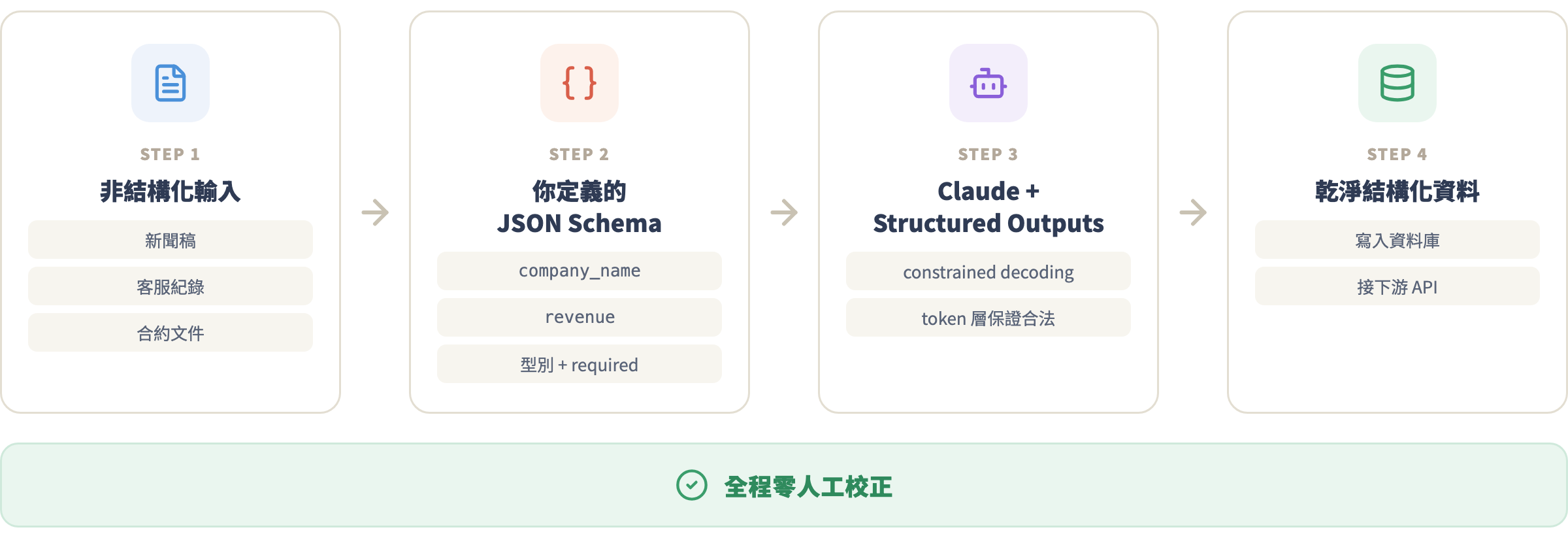
Structured Outputs 不只是「讓 JSON 不炸」這麼簡單。它讓你可以把 Claude 當成一個可靠的「資訊抽取引擎」——你定義 schema,它幫你從非結構化的文字(新聞稿、用戶 feedback、客服紀錄、合約文件)裡抽出乾淨的結構化資料,直接進資料庫或 API,中間不需要任何人工校正。這種抽取 pipeline 是很多 AI 自動化應用的核心,而你現在已經知道怎麼正確搭建它了。
作業
基礎版:拿任意一篇中文新聞稿(財經、科技、體育皆可),自己設計一份 3–5 個欄位的 schema,用 Structured Outputs 呼叫
claude-haiku-4-5(最便宜)把資料抽出來。驗證:把回應傳給json.loads()確認零錯誤。進階版:把 schema 改成含有陣列欄位的版本(例如「提到的人物列表」或「三個重點摘要」),並加入一個
Optional欄位(有資訊就填、沒有就 null)。確認 Pydantic 的.parse()方法能正確處理。防禦版:在你的程式碼裡加入
stop_reason的檢查,確保 refusal 和 max_tokens 的情況都有適當的錯誤處理,不會靜默失敗。
下一課預告
現在你可以讓 Claude 輸出你定義的任何資料結構。但如果你想讓 Claude 不只「回傳資料」,而是主動做事——查資料庫、呼叫第三方 API、執行計算、甚至控制你系統裡的函式——那就需要第 5 課的主題:Tool Use。Tool Use 讓你定義一組「工具」給 Claude,Claude 在對話過程中決定要不要呼叫哪個工具、傳什麼參數,你的程式執行完後把結果回傳給它,它再繼續推理。這是從「AI 問答機器」到「AI 代理程式」的關鍵一躍,也是整門課程技術密度最高的一堂——想好了嗎?