 精華筆記
精華筆記 Tool Use:讓 Claude 呼叫你的函式
你花了整個下午讓 Claude 幫你建對話機器人。一切運作良好,直到用戶問了一句:「現在台北氣溫幾度?」
Claude 沉默了一秒,然後禮貌地回答:「我的訓練資料有截止日期,無法提供即時天氣。」
對話就此斷掉。你的機器人變成了一個知識淵博但兩手空空的學者:能說天氣原理,卻不能開窗看看外面下不下雨。
Tool Use 就是那扇窗。它讓 Claude 不只是「說」,還能「做」:呼叫你寫的函式、查資料庫、呼叫外部 API,然後把結果整合進回答裡。這是從「聊天機器人」升級到「AI agent」的關鍵一步。
這堂學什麼
- 工具定義三元素:name、description、input_schema 各自的職責與設計要領
- tool use 完整迴圈:請求 → 偵測
tool_use→ 執行函式 → 回傳tool_result→ Claude 繼續 - tool_choice 控制行為:auto / any / 指定工具 / 停用工具
- 多工具協作:同一個請求提供複數工具,讓 Claude 自己選擇或同時呼叫
- 錯誤處理:工具執行失敗時怎麼告知 Claude
- 實戰:天氣+計算機雙工具 agent 雛形,完整可跑
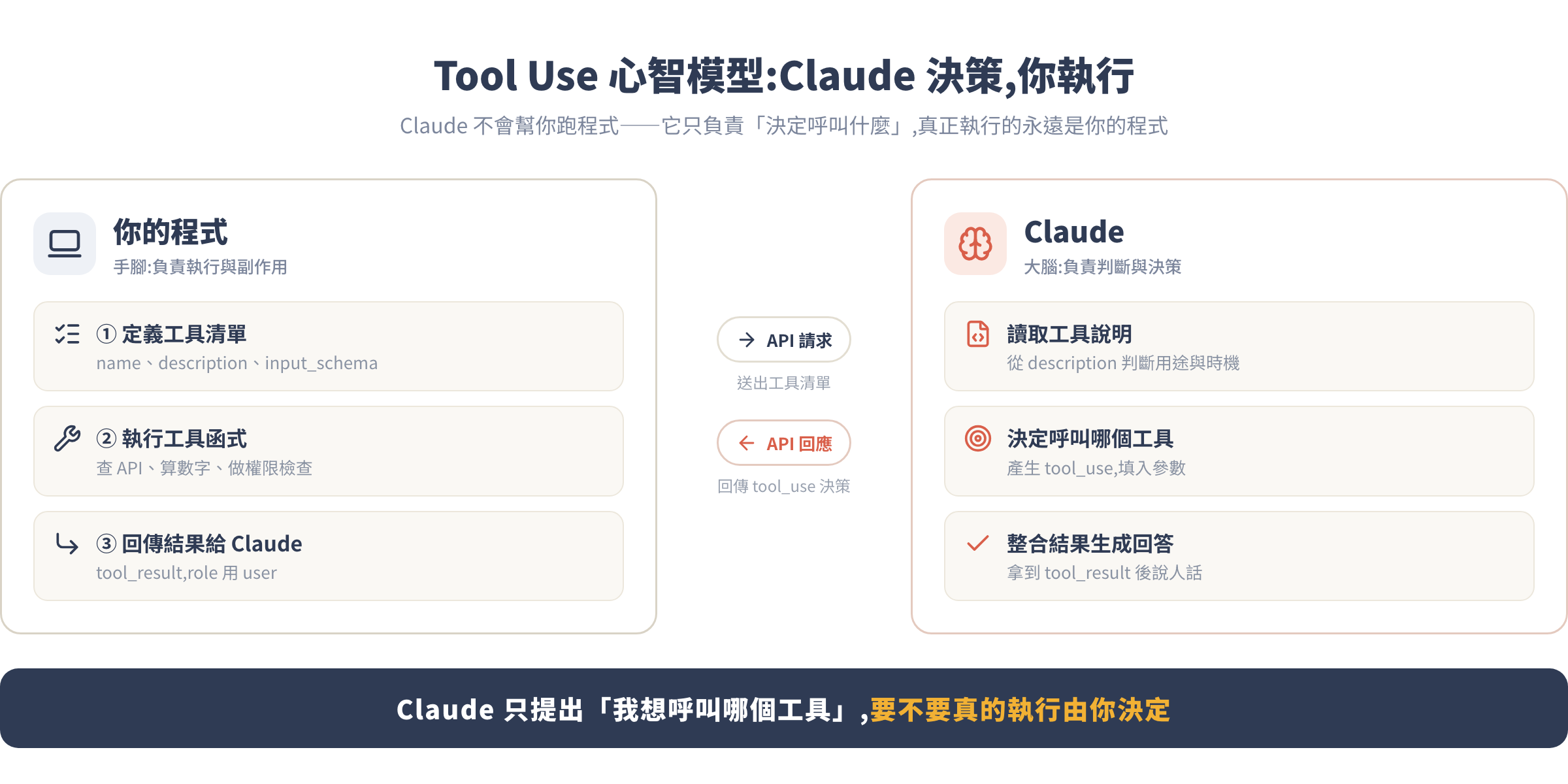
核心觀念:Claude 決策,你執行
Tool Use 最容易搞錯的心智模型是「Claude 會幫你跑程式」。不是的。正確理解是:
- Claude 讀取你給的工具說明,決定要不要呼叫、呼叫哪個、傳入什麼參數
- 你:接收 Claude 的決策,在自己的程式裡執行真正的函式,把結果回傳給 Claude
- Claude:拿到結果後繼續生成最終回答
Claude 是大腦,你的程式是手腳。
這個設計有個重要含意:工具的安全性、效能、副作用全都是你負責的。Claude 只是說「我想呼叫 delete_user(id=42)」,你的程式決定要不要真的刪、要不要先請用戶確認、要不要做權限檢查。這讓你對整個系統有完整的控制權。
Tool Use 什麼時候用?什麼時候不用?
| 適合用 Tool Use | 不需要 Tool Use |
|---|---|
| 需要即時資料(天氣、股價、資料庫) | 純文字生成、摘要、翻譯 |
| 需要精確計算(數字運算) | 知識問答(Claude 本身知道) |
| 需要寫入/更新外部系統 | 簡單的格式轉換 |
| 需要查詢用戶自己的資料 | 不需要外部資訊的對話 |
過度使用工具反而讓 Claude 慢、貴、複雜。先確認 Claude 本身知不知道,再決定要不要接工具。
工具定義的三個欄位
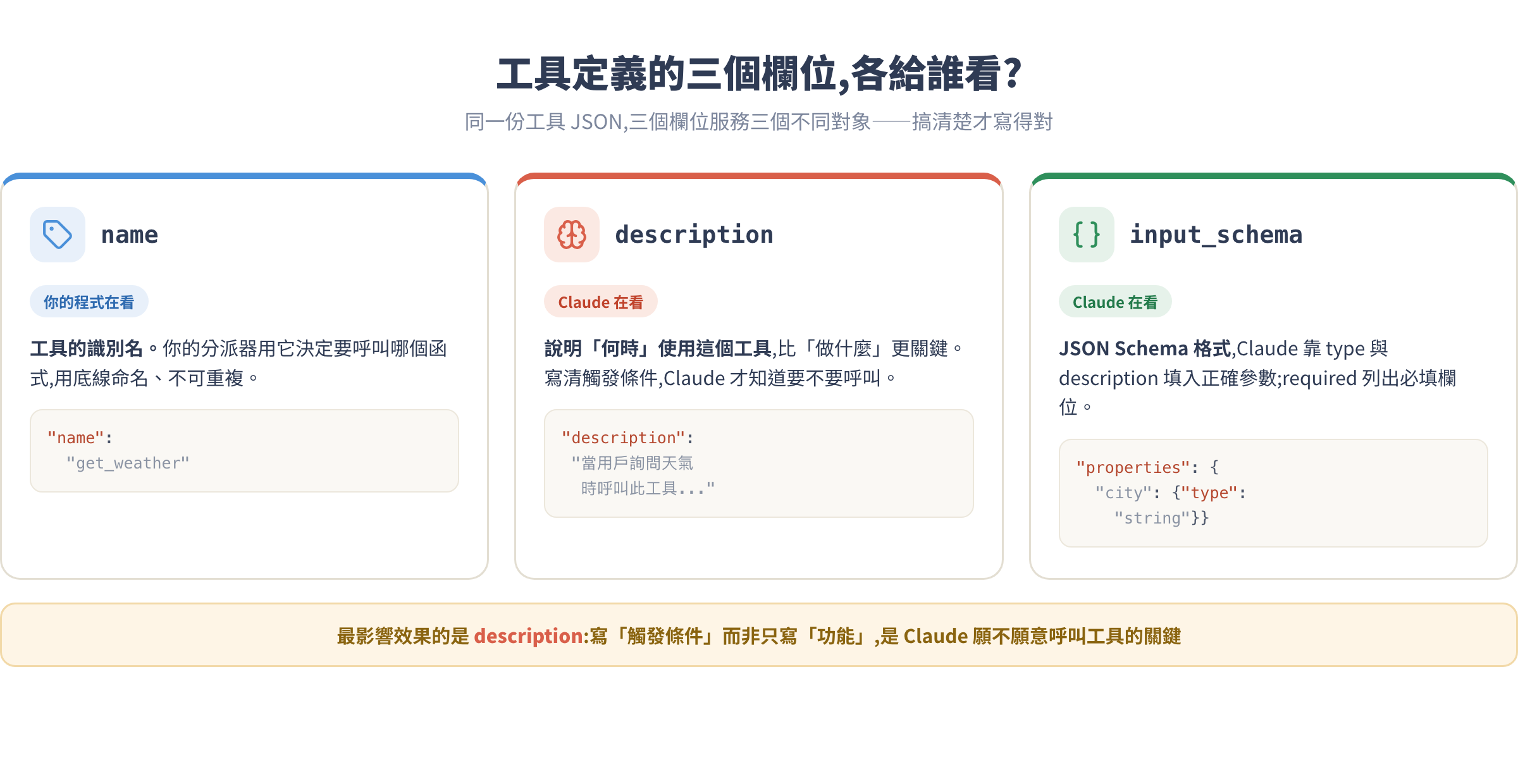
在開始寫程式之前,需要先理解 Claude 怎麼讀工具定義。你給 Claude 一份清單,說明「你可以使用這些工具,以下是每個工具的名稱、用途和需要的參數」。Claude 讀完之後,在回答用戶時會自己判斷:這個問題需不需要呼叫工具?要呼叫哪個?要傳什麼參數進去?這個判斷完全在 Claude 內部發生,你看不到思考過程,只看到最後的決策。
每個工具是一個字典,有三個欄位:
tool = {
    "name": "get_weather",                    # 工具識別名
    "description": "取得指定城市的即時天氣資訊,包含溫度與天氣狀況。"
                   "當用戶詢問天氣相關問題時呼叫此工具。",  # 讓 Claude 知道什麼時候用它
    "input_schema": {                          # JSON Schema 格式
        "type": "object",
        "properties": {
            "city": {
                "type": "string",
                "description": "城市名稱,例如 '台北' 或 'Tokyo'"
            },
            "unit": {
                "type": "string",
                "enum": ["celsius", "fahrenheit"],
                "description": "溫度單位,預設 celsius"
            }
        },
        "required": ["city"]  # 一定要傳入的參數
    }
}
三個欄位各有職責:
| 欄位 | 誰在看 | 設計重點 |
|---|---|---|
name |
你的程式 | 用來識別要呼叫哪個函式,用底線命名 |
description |
Claude | 說明何時使用這個工具,比「做什麼」更重要 |
input_schema |
Claude | JSON Schema,Claude 用來填入正確參數 |
description 是最影響效果的欄位。要寫清楚觸發條件,例如「當用戶詢問…時呼叫此工具」,不能只寫功能說明。
input_schema 用標準的 JSON Schema 格式。properties 底下每個參數都要寫 type 和 description,Claude 靠這些說明來填入正確的值。required 列出一定要有的參數——沒列進去的 Claude 可以省略,你的函式就要處理缺少參數的情況。
多個工具一起傳入時,Claude 會讀整份清單再做決定,所以工具名稱之間不能重複,description 也要寫得讓 Claude 能區分「什麼情況用哪個工具」,否則會產生錯誤的呼叫選擇。
tool use 完整迴圈
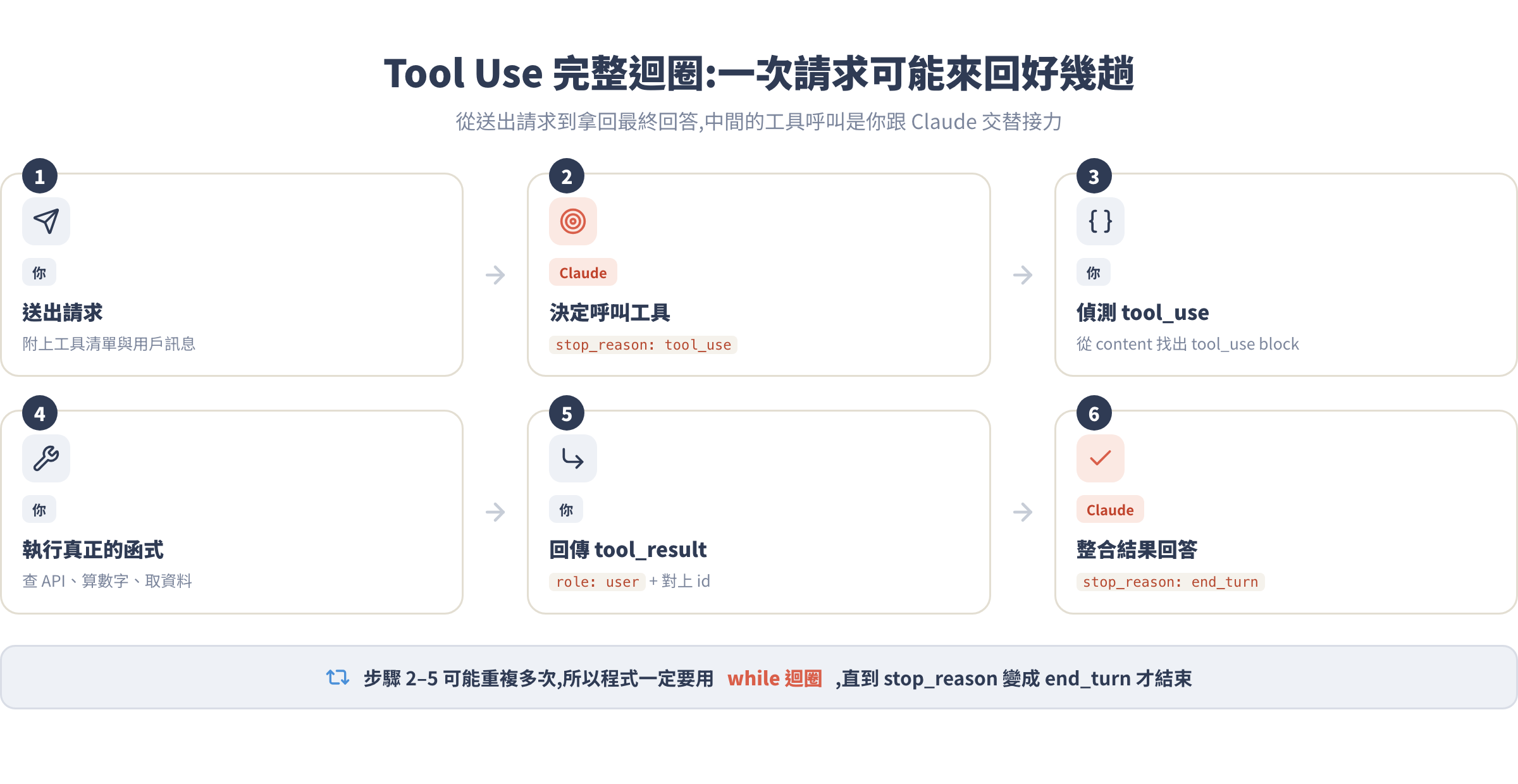
理解心智模型後,來看完整流程。這個迴圈是 Tool Use 的核心:
Step 1:安裝與準備
pip install anthropic
import anthropic
import json

client = anthropic.Anthropic()
Step 2:定義工具與模擬函式
先用假資料模擬天氣查詢和計算機功能:
# 工具定義清單
tools = [
    {
        "name": "get_weather",
        "description": "取得指定城市的即時天氣資訊。當用戶詢問天氣、溫度或氣候時呼叫此工具。",
        "input_schema": {
            "type": "object",
            "properties": {
                "city": {
                    "type": "string",
                    "description": "城市名稱,例如 '台北'、'Tokyo'、'New York'"
                },
                "unit": {
                    "type": "string",
                    "enum": ["celsius", "fahrenheit"],
                    "description": "溫度單位"
                }
            },
            "required": ["city"]
        }
    },
    {
        "name": "calculate",
        "description": "執行數學計算。當用戶需要計算數字時呼叫此工具,避免用語言模型直接做算術。",
        "input_schema": {
            "type": "object",
            "properties": {
                "expression": {
                    "type": "string",
                    "description": "數學運算式,例如 '(100 + 200) * 0.05'"
                }
            },
            "required": ["expression"]
        }
    }
]

# 模擬天氣資料(真實場景換成 API 呼叫)
def get_weather(city: str, unit: str = "celsius") -> dict:
    mock_data = {
        "台北": {"temp": 32, "condition": "晴天", "humidity": 75},
        "tokyo": {"temp": 28, "condition": "多雲", "humidity": 60},
        "new york": {"temp": 22, "condition": "小雨", "humidity": 80},
    }
    data = mock_data.get(city.lower(), {"temp": 25, "condition": "晴天", "humidity": 65})
    if unit == "fahrenheit":
        data["temp"] = data["temp"] * 9/5 + 32
    data["city"] = city
    data["unit"] = unit
    return data

# 計算機(用 eval 示範,正式環境請改用安全的計算函式庫)
def calculate(expression: str) -> dict:
    try:
        result = eval(expression, {"__builtins__": {}}, {})
        return {"result": result, "expression": expression}
    except Exception as e:
        return {"error": str(e), "expression": expression}

# 工具分派器:根據工具名稱呼叫對應函式
def execute_tool(tool_name: str, tool_input: dict) -> str:
    if tool_name == "get_weather":
        result = get_weather(**tool_input)
    elif tool_name == "calculate":
        result = calculate(**tool_input)
    else:
        result = {"error": f"未知工具: {tool_name}"}
    return json.dumps(result, ensure_ascii=False)
Step 3:基本單輪 Tool Use
先看最簡單的情況:Claude 呼叫一次工具:
def ask_with_tools(user_message: str) -> str:
    """完整 tool use 迴圈"""
    messages = [{"role": "user", "content": user_message}]

    while True:
        response = client.messages.create(
            model="claude-sonnet-4-6",
            max_tokens=1024,
            tools=tools,
            messages=messages
        )

        # 把 Claude 的回應加入對話歷史(包含 tool_use blocks)
        messages.append({"role": "assistant", "content": response.content})

        # 如果 Claude 決定不用工具,直接回答
        if response.stop_reason == "end_turn":
            # 找出文字回應
            for block in response.content:
                if block.type == "text":
                    return block.text
            return ""

        # Claude 要呼叫工具了
        if response.stop_reason == "tool_use":
            tool_results = []

            for block in response.content:
                if block.type == "tool_use":
                    print(f"[工具呼叫] {block.name}({block.input})")

                    # 執行工具
                    result = execute_tool(block.name, block.input)
                    print(f"[工具結果] {result}")

                    tool_results.append({
                        "type": "tool_result",
                        "tool_use_id": block.id,  # 對應 Claude 的呼叫 ID
                        "content": result
                    })

            # 把工具結果回傳給 Claude
            messages.append({"role": "user", "content": tool_results})
            # 繼續迴圈,等 Claude 整合結果

# 測試
answer = ask_with_tools("台北現在天氣怎麼樣?")
print(f"\n最終回答: {answer}")
執行結果大概長這樣:
[工具呼叫] get_weather({'city': '台北', 'unit': 'celsius'})
[工具結果] {"temp": 32, "condition": "晴天", "humidity": 75, "city": "台北", "unit": "celsius"}

最終回答: 台北目前天氣晴朗,氣溫 32°C,濕度 75%。今天是個好天氣!
注意幾個關鍵點:
while True迴圈是必要的。Claude 可能連續呼叫多個工具才結束messages.appendassistant 的完整 content,不能只存文字,必須保留tool_useblockstool_use_id必須和 Claude 給的block.id完全一致,否則 API 會報錯
**回傳的 messages 結構要注意:**工具結果要作為 role: "user" 的訊息送回,這是規定的對話格式——Claude 用 role: "assistant" 表達「我要呼叫工具」,你用 role: "user" 把工具結果送回,所以對話歷史永遠是 user → assistant → user → assistant 交替。
Step 4:JavaScript 版本(簡化核心迴圈)
import Anthropic from "@anthropic-ai/sdk";

const client = new Anthropic();

async function askWithTools(userMessage) {
  const messages = [{ role: "user", content: userMessage }];

  while (true) {
    const response = await client.messages.create({
      model: "claude-sonnet-4-6",
      max_tokens: 1024,
      tools: tools,  // 同 Python 定義的工具清單
      messages: messages,
    });

    messages.push({ role: "assistant", content: response.content });

    if (response.stop_reason === "end_turn") {
      const textBlock = response.content.find((b) => b.type === "text");
      return textBlock?.text ?? "";
    }

    if (response.stop_reason === "tool_use") {
      const toolResults = [];

      for (const block of response.content) {
        if (block.type === "tool_use") {
          const result = await executeTool(block.name, block.input);
          toolResults.push({
            type: "tool_result",
            tool_use_id: block.id,
            content: result,
          });
        }
      }

      messages.push({ role: "user", content: toolResults });
    }
  }
}
Step 5:tool_choice 控制策略
預設是 auto,Claude 自己判斷要不要用工具。你可以強制指定:
# 強制一定要用工具(不能純文字回答)
response = client.messages.create(
    model="claude-sonnet-4-6",
    max_tokens=1024,
    tools=tools,
    tool_choice={"type": "any"},   # 必須用至少一個工具
    messages=messages
)

# 強制用特定工具
response = client.messages.create(
    model="claude-sonnet-4-6",
    max_tokens=1024,
    tools=tools,
    tool_choice={"type": "tool", "name": "get_weather"},  # 一定要呼叫 get_weather
    messages=messages
)

# 禁用所有工具(有時候需要純文字回答)
response = client.messages.create(
    model="claude-sonnet-4-6",
    max_tokens=1024,
    tools=tools,
    tool_choice={"type": "none"},
    messages=messages
)
Step 6:多工具平行呼叫
Claude 不只能選一個工具,它可以在同一個 API 回應裡同時呼叫多個工具。這個能力很重要——如果你問「比較台北和東京的天氣」,Claude 不需要先查台北、等你回傳,再查東京,而是一次回傳兩個 tool_use block,你執行完兩個函式後把結果一起回傳,速度大幅提升。
預設行為是允許平行呼叫的。如果你希望 Claude 一次只呼叫一個工具(例如你需要嚴格控制執行順序),可以在 tool_choice 加上 disable_parallel_tool_use: true。
Claude 可以在同一個回應裡呼叫多個工具。以下問法會觸發:
answer = ask_with_tools("台北和東京的天氣差多少度?差距是多少?")
Claude 可能一次回傳兩個 tool_use blocks:先查台北天氣、再查東京天氣,你拿到兩個結果後一起回傳,Claude 再算差值或請你計算。
[工具呼叫] get_weather({'city': '台北'})
[工具呼叫] get_weather({'city': 'tokyo'})
[工具呼叫] calculate({'expression': '32 - 28'})

最終回答: 台北 32°C,東京 28°C,相差 4 度,台北比東京熱。
這就是為什麼要對所有 block.type == "tool_use" 都處理、收集成 tool_results 清單一起回傳。
Step 7:工具執行失敗的處理
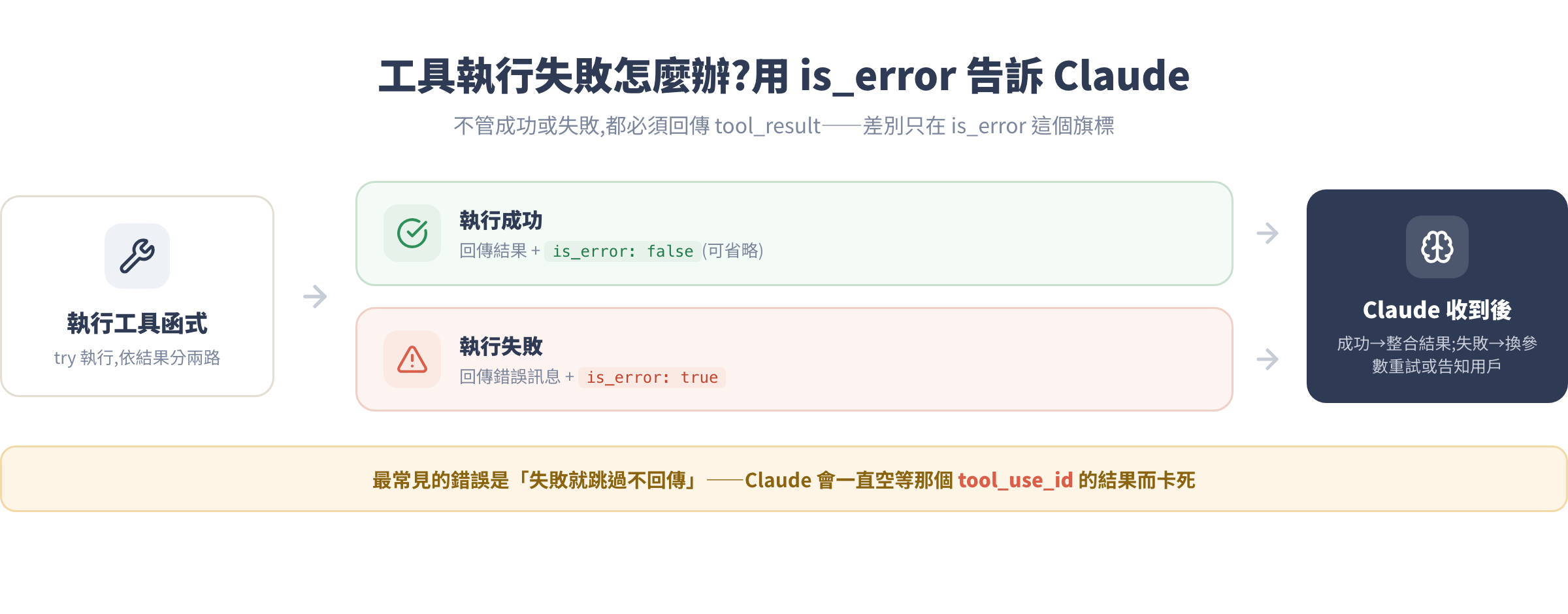
工具不一定成功執行。用 is_error 告知 Claude:
for block in response.content:
    if block.type == "tool_use":
        try:
            result = execute_tool(block.name, block.input)
            tool_results.append({
                "type": "tool_result",
                "tool_use_id": block.id,
                "content": result,
                "is_error": False  # 成功(可省略,預設 False)
            })
        except Exception as e:
            tool_results.append({
                "type": "tool_result",
                "tool_use_id": block.id,
                "content": f"工具執行失敗:{str(e)}",
                "is_error": True  # 告訴 Claude 這次失敗了
            })
Claude 收到 is_error: true 後,通常會調整策略(換個參數重試,或告訴用戶無法完成)。
完整實戰:天氣+計算機雙工具 agent
把前面所有東西組合成一個可以直接跑的 agent:
import anthropic
import json

client = anthropic.Anthropic()

# 工具定義
tools = [
    {
        "name": "get_weather",
        "description": "取得指定城市的即時天氣資訊,包含溫度、天氣狀況和濕度。"
                       "當用戶詢問天氣、氣溫、是否下雨等問題時呼叫此工具。",
        "input_schema": {
            "type": "object",
            "properties": {
                "city": {"type": "string", "description": "城市名稱"},
                "unit": {
                    "type": "string",
                    "enum": ["celsius", "fahrenheit"],
                    "description": "溫度單位,預設 celsius"
                }
            },
            "required": ["city"]
        }
    },
    {
        "name": "calculate",
        "description": "執行精確的數學計算。當需要計算數字、換算單位或做統計時使用。"
                       "不要自己猜測計算結果,一律呼叫此工具。",
        "input_schema": {
            "type": "object",
            "properties": {
                "expression": {
                    "type": "string",
                    "description": "合法的 Python 數學運算式,例如 '(32 - 0) * 5/9'"
                }
            },
            "required": ["expression"]
        }
    }
]

# 工具實作
def get_weather(city: str, unit: str = "celsius") -> dict:
    mock = {
        "台北": {"temp_c": 32, "condition": "晴天", "humidity": 75},
        "tokyo": {"temp_c": 28, "condition": "多雲", "humidity": 60},
        "london": {"temp_c": 15, "condition": "陰天", "humidity": 85},
    }
    data = mock.get(city.lower(), {"temp_c": 25, "condition": "晴天", "humidity": 65})
    temp = data["temp_c"] if unit == "celsius" else data["temp_c"] * 9/5 + 32
    return {
        "city": city,
        "temperature": round(temp, 1),
        "unit": unit,
        "condition": data["condition"],
        "humidity": data["humidity"]
    }

def calculate(expression: str) -> dict:
    allowed = {k: v for k, v in __builtins__.items()
               if k in ("abs", "round", "min", "max", "sum", "pow")} \
              if isinstance(__builtins__, dict) else {}
    try:
        result = eval(expression, {"__builtins__": allowed})
        return {"expression": expression, "result": result}
    except Exception as e:
        raise ValueError(f"無效運算式: {e}")

def execute_tool(name: str, tool_input: dict) -> tuple[str, bool]:
    """回傳 (結果字串, 是否出錯)"""
    try:
        if name == "get_weather":
            result = get_weather(**tool_input)
        elif name == "calculate":
            result = calculate(**tool_input)
        else:
            return f"未知工具:{name}", True
        return json.dumps(result, ensure_ascii=False), False
    except Exception as e:
        return str(e), True

def weather_agent(user_message: str, verbose: bool = True) -> str:
    messages = [{"role": "user", "content": user_message}]

    while True:
        response = client.messages.create(
            model="claude-sonnet-4-6",
            max_tokens=1024,
            tools=tools,
            messages=messages
        )

        messages.append({"role": "assistant", "content": response.content})

        if response.stop_reason == "end_turn":
            for block in response.content:
                if hasattr(block, "text"):
                    return block.text
            return ""

        if response.stop_reason == "tool_use":
            tool_results = []
            for block in response.content:
                if block.type == "tool_use":
                    if verbose:
                        print(f"  [工具] {block.name} <- {json.dumps(block.input, ensure_ascii=False)}")
                    content, is_error = execute_tool(block.name, block.input)
                    if verbose:
                        print(f"  [結果] {content}")
                    tool_results.append({
                        "type": "tool_result",
                        "tool_use_id": block.id,
                        "content": content,
                        "is_error": is_error
                    })
            messages.append({"role": "user", "content": tool_results})


# 測試幾個情境
if __name__ == "__main__":
    questions = [
        "台北現在天氣如何?適合出門嗎?",
        "台北和東京的氣溫差幾度?如果我要把台北的溫度換成華氏是幾度?",
        "12345 * 6789 等於多少?"
    ]

    for q in questions:
        print(f"\n問: {q}")
        answer = weather_agent(q)
        print(f"答: {answer}")
執行後你會看到 Claude 根據問題自動選工具、組合結果,最後生成完整的自然語言回答。
常見坑
坑 1:stop_reason 不是 tool_use 卻去找 tool_use blocks
症狀:程式在 response.content 裡找 tool_use block 卻找不到,或是程式提前結束只拿到空字串。
原因:當問題很簡單時,Claude 會直接回答,stop_reason 是 end_turn 而非 tool_use。很多初學者的程式忘記判斷 stop_reason,直接跑迴圈找工具就會出錯。
# 錯誤:沒判斷 stop_reason,直接假設 Claude 一定會用工具
for block in response.content:
    if block.type == "tool_use":  # Claude 沒用工具時這裡永遠跳過
        ...

# 正確:先判斷 stop_reason
if response.stop_reason == "end_turn":
    return get_text_from_response(response)
elif response.stop_reason == "tool_use":
    # 處理工具呼叫
    ...
坑 2:沒有 while 迴圈,只跑一輪就結束
症狀:Claude 回傳了 tool_use,你執行工具、回傳結果,但程式就結束了。最終回答是空的,或是 Claude 的中間過程而不是最終整合後的答案。
原因:Tool Use 的過程是「請求 → 工具 → 再請求 → 再工具 → …→ 最終回答」,有時需要多輪。沒有 while True 就只能跑一輪。
# 錯誤:只呼叫一次 API
response = client.messages.create(...)
# 就算 Claude 還沒說完,程式就結束了

# 正確:用迴圈,直到 stop_reason == "end_turn"
while True:
    response = client.messages.create(...)
    if response.stop_reason == "end_turn":
        break
    # 處理工具呼叫並繼續
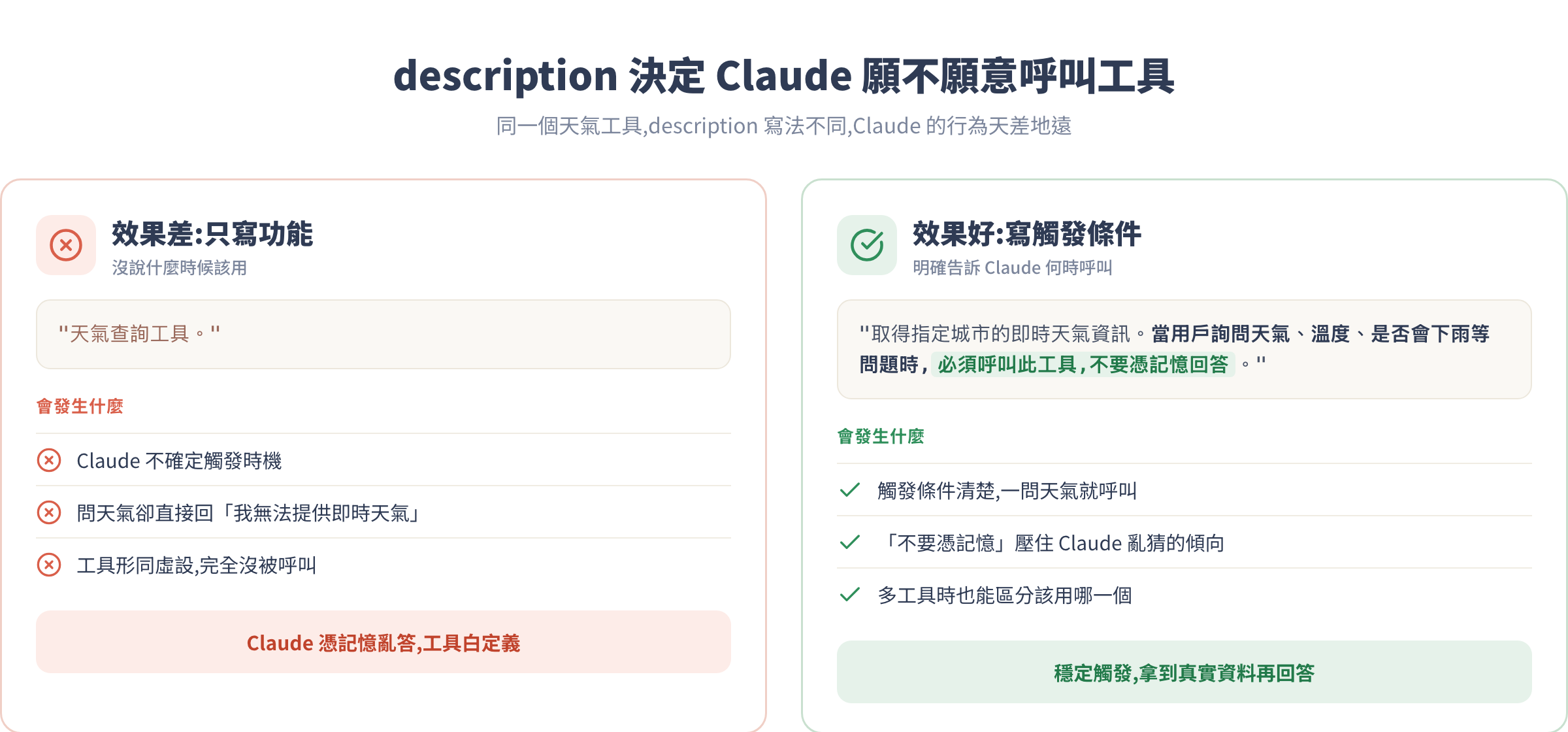
坑 3:description 寫得太模糊,Claude 不知道什麼時候用
症狀:明明問了天氣問題,Claude 卻直接回答「我不知道即時天氣」,完全沒呼叫工具。
原因:description 寫的是「功能」而不是「觸發條件」。Claude 靠 description 決定什麼時候用工具,如果你只寫「取得天氣資料」而沒說「當用戶詢問天氣時」,Claude 可能不知道要觸發。
# 效果差:只說功能
"description": "天氣查詢工具。"

# 效果好:明確說觸發條件
"description": "取得指定城市的即時天氣資訊。當用戶詢問天氣、溫度、是否會下雨、"
               "出門要不要帶傘等問題時,必須呼叫此工具,不要憑記憶回答。"
坑 4:tool_use_id 對不上,API 直接噴錯
症狀:回傳 tool_result 時收到 API 錯誤,訊息大概是 invalid tool_use_id 或 tool_use_id does not match any tool_use in the conversation。
原因:你在收集 tool_results 時,沒有用 Claude 回傳的 block.id,而是自己生了一個 ID,或是複製貼上時打錯。
# 錯誤:自己造 ID
tool_results.append({
    "type": "tool_result",
    "tool_use_id": "my_custom_id_001",  # 這個不存在於對話歷史中
    "content": result
})

# 正確:用 block.id
for block in response.content:
    if block.type == "tool_use":
        tool_results.append({
            "type": "tool_result",
            "tool_use_id": block.id,  # 直接用 Claude 給的 ID
            "content": result
        })
坑 5:回傳的 content 型別不對
症狀:工具結果送出去後,Claude 的回答出現奇怪的解讀,或是 API 回傳 400 Bad Request。
原因:tool_result 的 content 欄位必須是字串。你如果把 Python dict 或 list 直接丟進去,會出問題。
# 錯誤:把 dict 直接放進 content
tool_results.append({
    "type": "tool_result",
    "tool_use_id": block.id,
    "content": {"temp": 32, "city": "台北"}  # 這會出錯
})

# 正確:先序列化成 JSON 字串
tool_results.append({
    "type": "tool_result",
    "tool_use_id": block.id,
    "content": json.dumps({"temp": 32, "city": "台北"}, ensure_ascii=False)
})
模型選擇與成本考量
Tool Use 不一定要用最貴的模型。以 2026 年 7 月的定價為例:
| 模型 | 每百萬 Input Token | 每百萬 Output Token | 適合 Tool Use 場景 |
|---|---|---|---|
Claude Opus 4.8 (claude-opus-4-8) |
$5.00 | $25.00 | 複雜多步驟 agent、需要高品質判斷 |
Claude Sonnet 4.6 (claude-sonnet-4-6) |
$3.00 | $15.00 | 一般 agent、CP 值高 |
Claude Haiku 4.5 (claude-haiku-4-5) |
$1.00 | $5.00 | 簡單工具選擇、高流量低複雜度 |
Tool Use 的 token 消耗比一般對話多,因為每次請求要附上所有工具的定義。如果你有 5 個工具,每個定義約 200 token,光是工具定義就先扣了 1000 token。工具多的時候,建議評估是否把不常用的工具拆成不同端點或按需載入。
建議開發階段用 Sonnet 4.6,功能確定後再依複雜度決定是否升 Opus 或降 Haiku。
作業
基礎:把本課的天氣+計算機 agent 跑起來,測試至少五個問題,包含需要同時查兩個城市天氣的問句。觀察 Claude 的
stop_reason和它呼叫工具的順序。進階:再新增一個工具,例如
search_news(topic: str)或convert_currency(amount, from_currency, to_currency),寫模擬資料,接入 agent 迴圈。試著讓 Claude 在一個問題裡同時用到三個工具。挑戰:把
get_weather的模擬資料換成真正的天氣 API,例如 Open-Meteo(免費,不需要 API Key)。測試真實資料和模擬資料的回答差異。觀察題:把
calculate的 description 改成只說「執行計算」(不寫觸發條件),問 Claude「1234 × 5678 等於多少?」,觀察它有沒有用工具還是自己猜。
下一課預告
你現在有了一個能呼叫工具的 agent,但它有兩個限制:每次回應都得等完整結果才能繼續(用戶要乾等),而且只能處理文字。
第 6 課教你解決這兩件事:用 Streaming 讓回答一邊生成一邊輸出,用戶不用等到底就能看到進度;再加入多模態輸入讓 Claude 能讀圖——用戶傳一張餐廳菜單或截圖,Claude 直接理解。結合 Tool Use,你的 agent 就能看圖、說話、採取行動,一氣呵成。